
Part I: Understanding the Identity Model
1. The Secret Nobody Remembers Creating
Some security incidents start with an attacker. This one started with a colleague trying to get an automation to work.
In the middle of a Teams conversation, someone posted the credentials of an app registration in the channel: the tenant ID, the client ID and the client secret. That is everything another person needs to authenticate as that application, in plain text, in a channel other people could read.
It is easy to treat that as one person’s mistake. I think it says more about how we hand out credentials.
A client secret is a password for an application. Anyone who has it can request a token and act with every permission that application has been granted, from anywhere, without a second factor. A service principal can’t respond to an MFA prompt, so the secret is the entire proof of identity. If the app registration holds application permissions on Microsoft Graph, the secret isn’t access to one automation. It can be access to every mailbox, site or user those permissions cover.
And it doesn’t stay where it was posted. The message remains in the channel history. It shows up in search, is visible to anyone who joins the channel later, and is kept for as long as the retention policy says. The person who shared it moves on to the next task. A few weeks later, nobody remembers the conversation. The secret is still valid, and nobody knows which automations would break if it were rotated. That is the secret nobody remembers creating: not lost, just forgotten in plain sight.
What worries me is where this is heading. AI assistants have made it remarkably easy to build an integration. Describe what you want, and you get a working script, instructions for creating an app registration and, often, a placeholder for the secret. The barrier to doing technical work has dropped. The understanding of what that work means hasn’t come along with it. Someone can now create an app registration, grant it API permissions and wire it into an automation without ever learning what a service principal is, or why a secret should never leave a vault.
That isn’t a reason to keep people away from automation. It is a reason to stop designing setups in which a copyable secret is the default. If a workload can authenticate without a secret, there is nothing to post in a channel, nothing to forget and nothing to rotate in a hurry.
That is what this article is about. Not which identity object sounds right, but how a workload should prove who it is, and how to make the safest option also the easiest one.
2. Three Types of Service Accounts
Software needs an identity just like people do. A script that reads a mailbox, a pipeline that deploys to Azure or a flow that writes to Dataverse has to prove who it is before it gets access. In Microsoft Entra ID, there are three ways to give it one: managed identities, service principals, and user accounts employed as service accounts.
A note on terminology first. In everyday use, “service account” usually means the third type: a regular user account set aside for automation. Microsoft uses the term for all three. This article follows everyday use in the title and Microsoft’s definition in the text. The word you may also have come across is workload identity. That isn’t a fourth option. It is Microsoft’s umbrella term for identities assigned to software, and it covers the same objects described here.
Managed identity
A managed identity is an identity for an Azure resource whose credentials are managed by Azure. There is no secret for you to see, copy or rotate. The resource requests tokens from the platform, and Azure handles the rest.
There are two kinds. A system-assigned managed identity is enabled on a single resource, such as a Function App or Logic App, and is deleted together with it. A user-assigned managed identity is a standalone Azure resource with its own lifecycle, and it can be assigned to several resources at once.
The limitation is in the name: managed identities only work for workloads Azure can vouch for, which in practice means Azure resources. Step 1 covers the one notable exception.
Service principal
A service principal is the identity of an application in your tenant. You create one by registering an application, which produces two objects.
The application object, under App registrations, is the definition: its name, the permissions it requests and the credentials it can use.
The service principal, under Enterprise applications, is the instance that actually signs in and receives permissions.
Credentials live on the application object; permissions are granted to the service principal. That is why the client ID someone shares and the object ID you need for a role assignment are two different values.
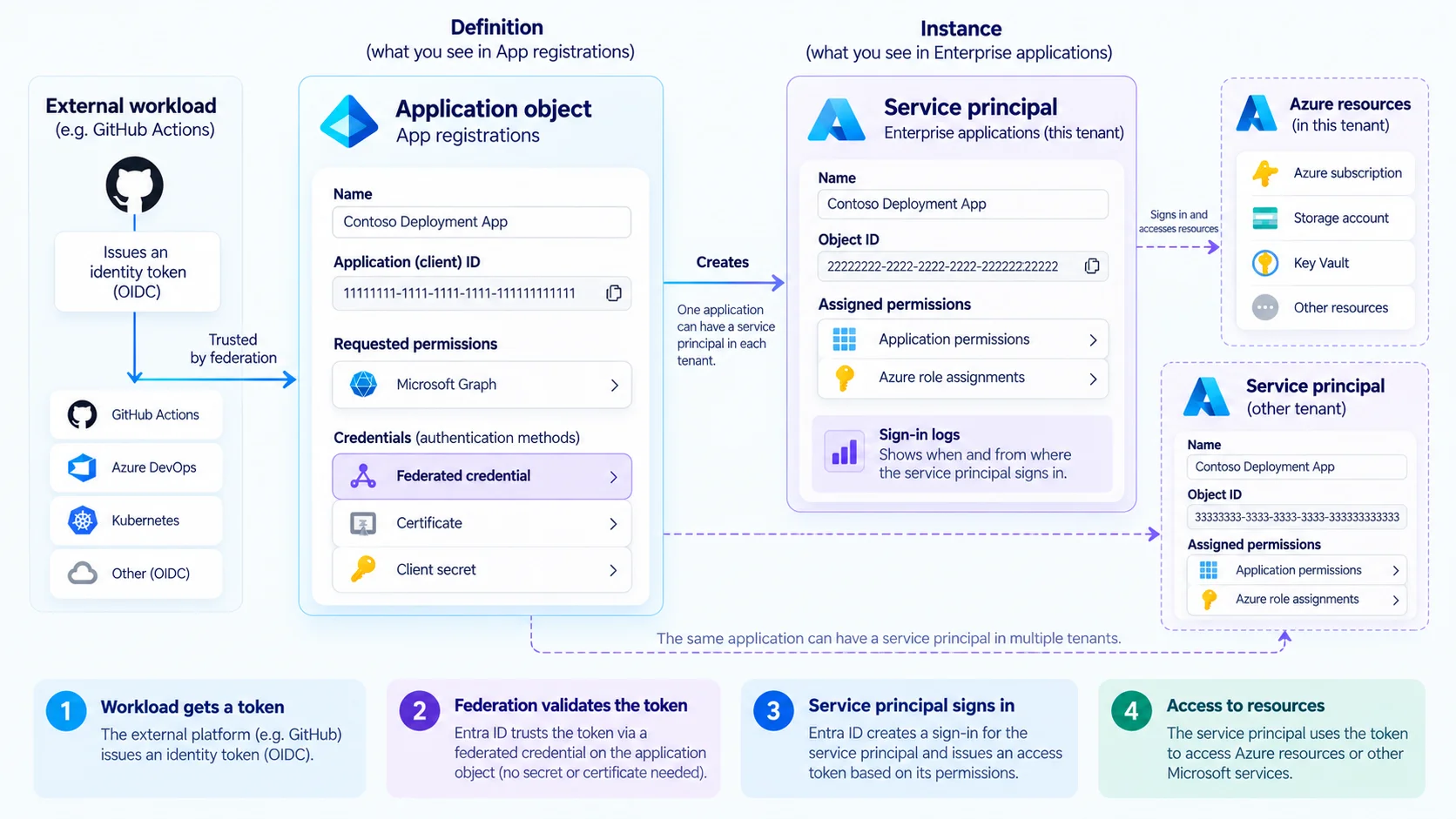
Technically, a managed identity is also a service principal. The difference is who manages the credential. In this article, “service principal” means one you manage yourself, with a secret, a certificate or a federated credential. That difference is exactly what the decision comes down to.
User account as a service account
The third type is a regular user account used by software instead of a person. It signs in with a username and password, just like an employee. It can log in interactively, it can hold licenses, and it can do anything a user with the same permissions can do.
That is also its weakness. Because no single person owns it, the password and MFA methods are often shared between multiple individuals. In practice, these accounts are frequently excluded from MFA or Conditional Access, because a script can’t respond to a prompt. Microsoft is clear about this: it does not recommend user accounts as service accounts because they are less secure, and that includes on-premises service accounts synced to Entra ID, because they aren’t converted to service principals.
They are still everywhere, and not always out of carelessness. Some tools and connectors only support signing in as a user. Chapter 6 covers when that leaves you no choice, and how to limit the damage.
What about AI agents?
Microsoft recently added a separate identity type for AI agents: the agent identity, part of Microsoft Entra Agent ID. It is built on the same service principal infrastructure, but it is a distinct object type. It isn’t an option for a Function App, a script or a pipeline, and it deserves its own article. This guide covers the three types above.
The three types side by side
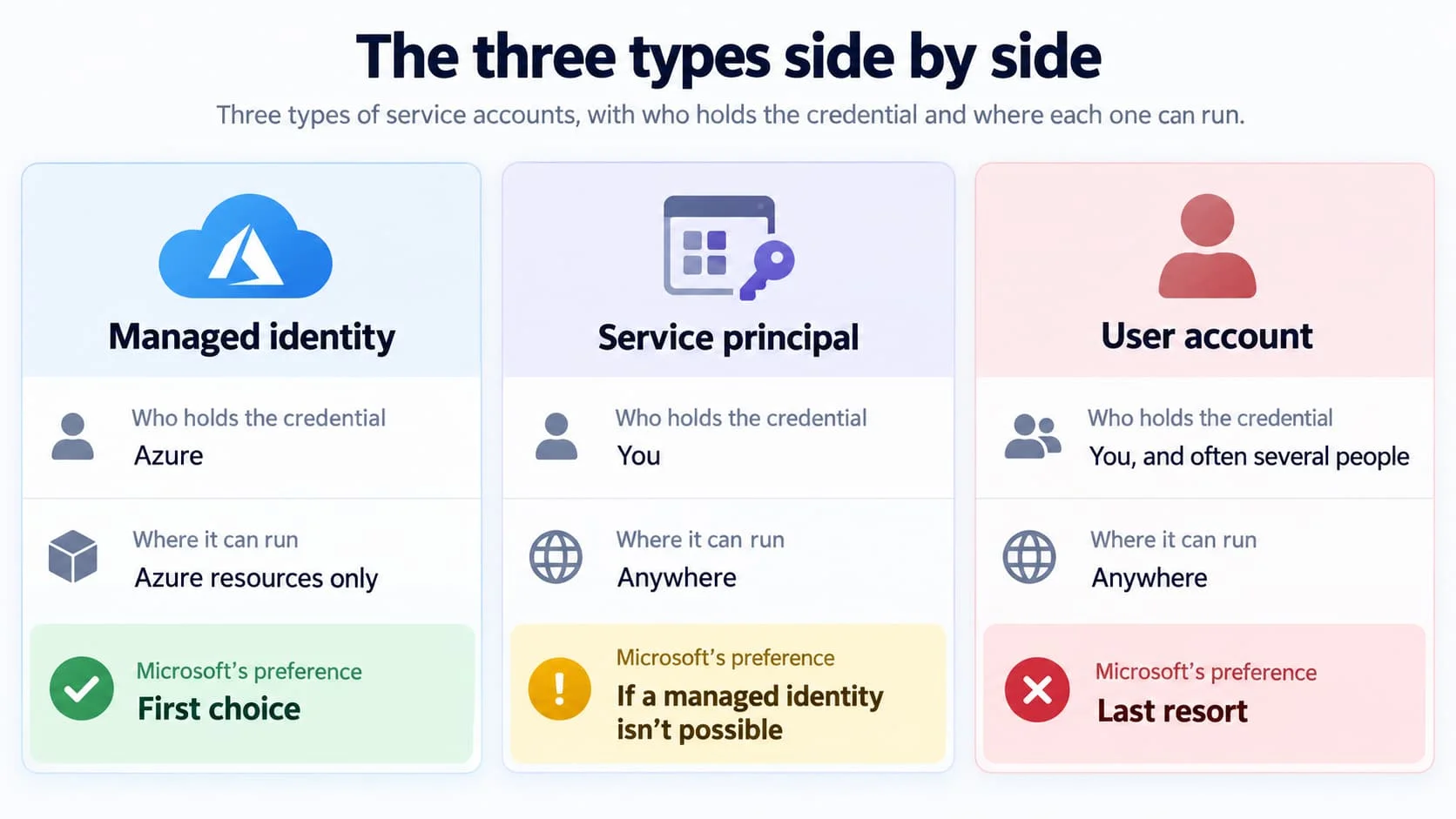
Type | Who holds the credential | Where it can run | Microsoft’s preference |
|---|---|---|---|
Managed identity | Azure | Azure resources only | First choice |
Service principal | You | Anywhere | If a managed identity isn’t possible |
User account | You, and often several people | Anywhere | Last resort |
Microsoft’s order is straightforward: use a managed identity when possible; if you can’t, use a service principal; and only if that isn’t possible either, use a user account. The next chapter explains why the order is what it is.
3. Why the Order Exists
Microsoft’s order can look like a preference: managed identity first, service principal second, user account last. It is more than that. Behind it is one question: how much of the credential is in human hands? Every identity proves who it is with something. The order ranks how easily that proof can be seen, copied, shared, forgotten or misused.
Starting from the bottom makes the logic clearest.
User account: a password in many hands
A user account used as a service account signs in with a password. Somebody created it, somebody typed it into a connection or a script, and over time more people tend to learn it. Because software can’t respond to an MFA prompt, these accounts are often excluded from MFA, which leaves the password as the only barrier.
There is a second problem that gets less attention. A user account can sign in interactively. Anyone who knows the password can open a browser and log in as the account. The sign-in logs then show the service account, but not whether it was the script or a colleague who did it. Accountability disappears exactly where you need it most.
Service principal: a credential you hold
A service principal can’t sign in interactively, which already removes that second problem. But it still needs a credential, and that credential is still yours to manage. There are three options, and they are not equal.
A client secret is a string, much like a password. Anyone who has it can request tokens as the application, from anywhere. The admin center limits its lifetime to two years, which limits exposure but also guarantees that something will break on the day it expires, usually in a process nobody remembers depends on it. Microsoft considers client secrets less secure than certificates or federated credentials, and says they shouldn’t be used in production.
A certificate is Microsoft’s recommended alternative. The difference is in how it proves identity. A secret is sent to Entra ID as it is. With a certificate, the application uses its private key to sign a request, and the key itself never leaves the application. Kept in a key vault, it is much harder to copy into a chat message by accident. That advantage depends on how it’s stored, though: Microsoft advises against storing certificate files on disk with their password in configuration. A certificate file with its password next to it is just a secret with extra steps.
A federated credential removes the stored credential altogether. Instead of a secret or certificate, you configure a trust relationship between an external identity provider, such as GitHub, and the application in Entra ID. The workload then exchanges a token from that provider for an access token from Microsoft. Entra ID checks the issuer and subject in the incoming token against the trust you configured, and only issues a token if they match. There is nothing to store, rotate or leak. The risk doesn’t disappear entirely, though: it moves to the trust configuration. What you trust becomes the credential. Chapter 5 covers how that goes wrong.
Managed identity: nothing to hold
A managed identity takes the last step. Azure creates the credential, stores it and rotates it. Nobody in your organization ever sees it, so there is nothing to post in a Teams channel and nothing to expire unnoticed.
That doesn’t mean it can’t be misused. The credential isn’t held by a person, but it is available to the resource. Anyone who can run code on that resource, for example by deploying to a Function App, can act with its identity. The security question shifts from who knows the secret? to who can change what runs here? That is a much better question to have, because deployment rights are something you already control. But it is still a question.
The order at a glance
Who can see the credential? | Can it be copied? | Interactive sign-in? | Who rotates it? | |
|---|---|---|---|---|
User account | Everyone who knows the password | Yes | Yes | You, often never |
Service principal with secret | Whoever created or stores it | Yes | No | You, usually when it expires |
Service principal with certificate | Whoever can access the private key | Harder, if stored properly | No | You |
Service principal with federation | Nobody | Nothing to copy | No | Not needed |
Managed identity | Nobody | Nothing to copy | No | Azure |
What the order doesn’t tell you
The order ranks credentials. It says nothing about permissions, and that is the other half of the risk.
The credential determines how likely misuse is. The permissions determine how bad it gets when it happens. A managed identity that can read every mailbox in the tenant is more dangerous than a service principal with a certificate that can only write to one SharePoint list. Choosing the right type of identity doesn’t make broad permissions safe.
So use the order as the default, not as the whole answer. Part II walks through it step by step, starting with the first question: can the workload use a managed identity at all?
Part II: The Decision Guide
4. Step 1: Can It Use a Managed Identity?
The first question in the decision is simple to ask and sometimes surprisingly hard to answer. A workload can use a managed identity when two conditions are met: it runs somewhere Azure can vouch for it, and the service it connects to accepts Microsoft Entra ID tokens. If either condition fails, a managed identity isn’t an option, however much you’d like it to be.
Condition one: where does the workload run?
A managed identity works because Azure knows the resource. When a Function App or virtual machine requests a token, the platform can verify which resource is asking and hand out a token for its identity. That is why managed identities are tied to Azure resources: Azure can only vouch for what it controls.
There is one notable extension. Servers outside Azure can be onboarded with Azure Arc, and applications running on an Arc-enabled server can use its managed identity to access Azure resources that support Entra ID authentication. That makes it possible to remove secrets from scripts on servers in your own data center.
It comes with a condition worth knowing. On an Arc-enabled server, privileged local roles such as local administrators control who can request tokens, and Microsoft advises keeping those roles tight to prevent misuse of the managed identity. The principle from the previous chapter applies directly: there is no secret to steal, but whoever controls the machine controls the identity.
Condition two: does the target accept Entra ID tokens?
A managed identity proves who the workload is to Microsoft Entra ID. That only helps if the service on the other side trusts Entra ID. Key Vault, Storage, Azure SQL and Microsoft Graph do. A third-party API that only accepts an API key or a username and password doesn’t, and no managed identity will change that.
Even then, a managed identity can still improve the situation. Store the API key in Key Vault and let the workload retrieve it with its managed identity. The key still exists, but it no longer lives in code, configuration files or someone’s clipboard. It isn’t the ideal end state, but it removes the most common way secrets leak.
System-assigned or user-assigned?
If both conditions are met, the next choice is which kind of managed identity to use. This is where the obvious answer and Microsoft’s advice differ.
The obvious answer is system-assigned: one resource, one identity, removed together. Microsoft is more nuanced and states that user-assigned managed identities are more efficient in a broader range of scenarios. Its reasoning is practical:
A user-assigned identity and its role assignments can be set up before the resources that need them exist.
When several resources need the same access, sharing one identity means fewer identities and role assignments to manage. In Microsoft’s example, four virtual machines sharing a user-assigned identity need two role assignments instead of eight.
Microsoft is equally clear about where system-assigned is the better choice. If you need logs to show which specific resource performed an action, rather than which identity, use system-assigned. The same applies if permissions should disappear together with the resource.
Both views are correct, because they optimize for different things. User-assigned optimizes for manageability. System-assigned optimizes for traceability and least privilege. Sharing an identity across resources is efficient, but it also means every one of those resources can do everything the identity can, and the logs can no longer tell you which one did.
A workable rule:
Use user-assigned when several resources genuinely need identical access, or when the identity has to exist before the resource does.
Use system-assigned when a resource has its own purpose and its own permissions.
Never share a user-assigned identity between unrelated workloads just because it already has the right permissions. That is how a managed identity slowly turns into the shared service account this article warns against.
One cleanup detail applies to both: role assignments aren’t automatically deleted when a managed identity is deleted. Deleting the resource doesn’t fully clean up after it.
What about Power Platform?
Power Platform has its own form of managed identity. Dataverse plug-ins can use it to connect to Azure resources that support managed identity, without anyone managing credentials. The typical example is a plug-in that reads a secret from Key Vault.
Under the hood, it works differently from a managed identity on an Azure resource. It relies on federated identity credentials configured on a user-assigned managed identity or an app registration in your tenant. Technically, that makes it federation, the topic of the next chapter. For the maker it behaves like a managed identity: there is no secret to store or rotate.
Outside plug-ins, support is uneven and still expanding. Don’t assume every connector or flow can use a managed identity. Most standard connectors in Power Automate run on connections tied to an account, which is exactly why so many flows end up under a service account. Chapter 6 deals with that.
The developer’s laptop
There is one place where managed identities predictably cause trouble: local development. A developer’s laptop isn’t an Azure resource, so the managed identity doesn’t work there. Under time pressure, the quickest fix is to create a client secret “just for testing”. That secret then ends up in a configuration file, a repository or, as chapter 1 showed, a Teams channel.
There is no need for it. The Azure Identity libraries can use the managed identity when the code runs in Azure and fall back to the developer’s own signed-in account when it runs locally. The code stays the same, the developer tests with their own permissions, and no secret is ever created. Make that pattern the standard before the first secret appears.
If the answer is no
If the workload runs outside Azure and can’t be onboarded with Arc, a managed identity is off the table. That doesn’t mean you have to fall back to a secret. The next step is a service principal, and the most important decision there is which credential you give it.
If the target doesn’t accept Entra ID tokens at all, a service principal won’t help either, because it authenticates through Entra ID as well. You’re then either storing an API key in Key Vault, as described above, or dealing with a system that requires a signed-in user, which is Step 3.
5. Step 2: A Service Principal, With the Right Credential
When a managed identity isn’t possible, the next option is a service principal. Creating one is the easy part: register an application and the identity exists. The decision that actually matters comes after that, because a service principal is only as secure as the credential it uses. As chapter 3 showed, there are three options, and the order is the same as before: federation first, then a certificate, and a client secret only as a last resort.
The figure in chapter 2 shows this flow end to end, from the token GitHub issues to the access token Entra ID returns.
When a service principal is the right identity
Most workloads reach this step because they run outside Azure: a pipeline in GitHub, a script on a server, an integration running at a SaaS vendor. But there are also situations where a service principal is the right choice even for a workload in Azure.
Managed identities can only belong to a single tenant, so an application used by other organizations needs an app registration. The same applies to an application that people sign in to, or that exposes its own API to other applications. Those are capabilities of an app registration, not of a managed identity.
First choice: federation
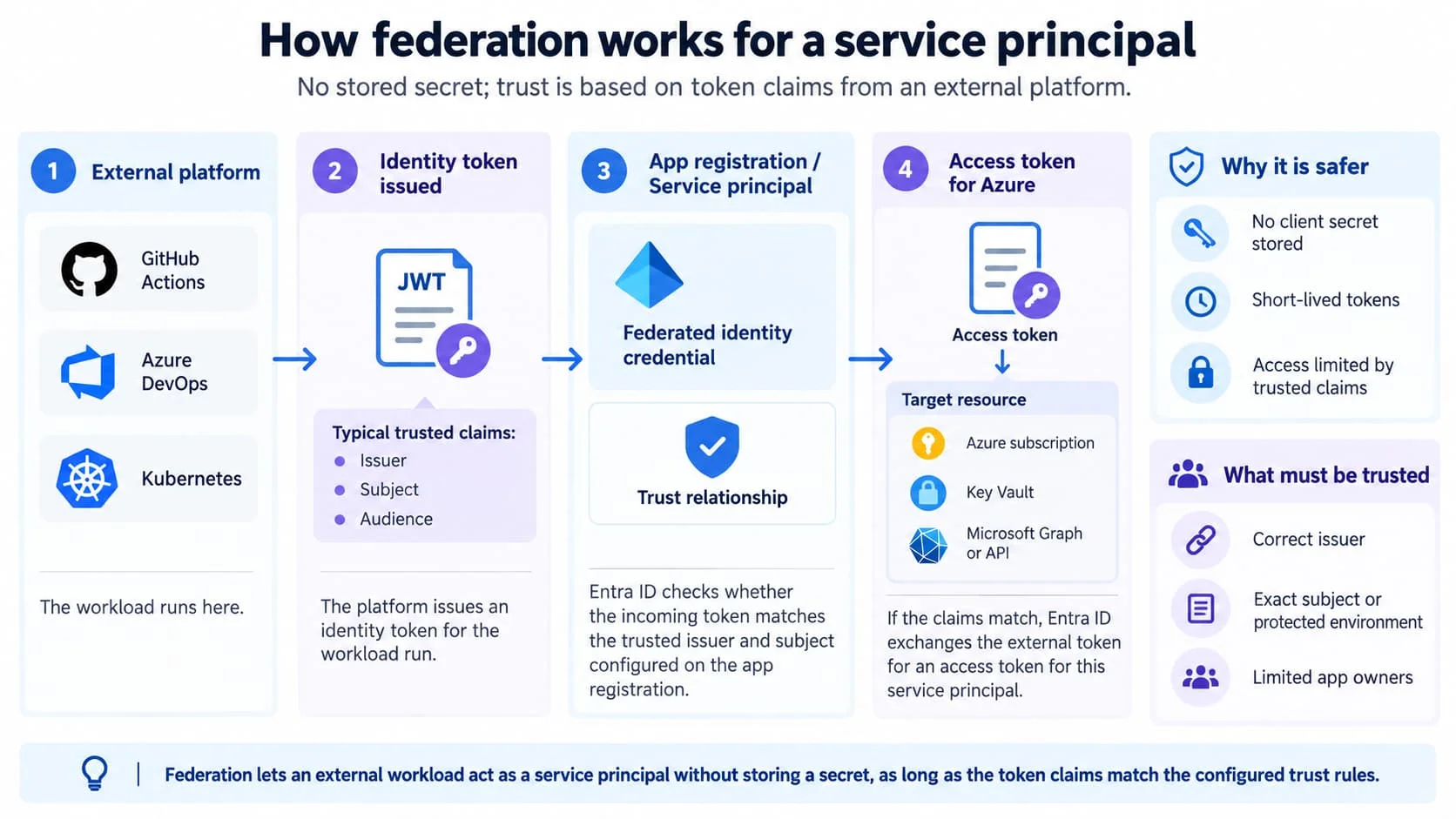
If the workload runs on a platform that issues its own identity tokens, federation is almost always possible. GitHub Actions, Azure DevOps, Kubernetes clusters and other clouds all do. Instead of storing a credential, you configure a federated identity credential on the app registration: a trust relationship that says tokens from this issuer, for this subject, may be exchanged for a token for this application.
For pipelines, this has become the standard. Azure DevOps recommends workload identity federation for new service connections, and existing ones can be converted. For service connections that Azure DevOps created itself, there is a built-in conversion tool. If your organization still has pipelines running on secrets, this is usually the quickest security improvement available.
How federation goes wrong
Federation removes the stored secret, but as chapter 3 put it: what you trust becomes the credential. A federated credential is only as strong as the conditions it checks.
Take GitHub Actions. The subject claim in GitHub’s token depends on what triggered the workflow. A push to a branch produces a different subject than a pull request or a deployment to a protected environment. If a federated credential trusts the pull request subject, any workflow run triggered by a pull request in that repository satisfies it. Anyone who can open a pull request and influence the workflow can then act as your service principal.
Microsoft’s own guidance points in the right direction. Branches and tags have to match exactly; pattern matching isn’t supported. For workflows that run on many branches, Microsoft recommends using an environment instead. Environments matter because GitHub lets you protect them with required reviewers. A sound pattern is to separate trust by purpose. One Microsoft example uses three federated credentials for one service principal: read-only checks on pull requests, and write access in production only from a deployment environment that requires approval.
There is a second, less visible risk. Whoever can manage an app registration can add a federated credential to it, including one that trusts a repository they control. In that sense, owner rights on an app registration are the credential. Keep the list of owners short and watch for new credentials appearing in the audit logs.
Second choice: a certificate
Some workloads have no token issuer to federate with: a scheduled task on a server outside Azure and Arc, an older application, or a third-party product that supports certificate authentication but not federation. Then a certificate is the next best option.
The strength of a certificate is that the private key never needs to leave the machine that uses it. That advantage disappears as soon as someone exports the key to a file and puts the password next to it. Keep the private key in Key Vault or the machine’s certificate store, give every workload its own certificate, and never reuse one across applications.
Plan rotation before the first certificate expires. An application can hold more than one credential at the same time, so you can add the new certificate before removing the old one, without downtime. Application management policies in Entra ID let you enforce a maximum lifetime for certificates as well. Microsoft’s own tutorial uses 180 days as an example.
Last choice: a client secret
Sometimes there is no alternative. Plenty of SaaS products and integration tools only offer two fields: client ID and client secret. In that case, the secret is unavoidable, and the goal becomes making it as harmless as possible:
One secret per consumer, so you know exactly what breaks when you rotate it and can revoke one without affecting the others.
The shortest lifetime the process can realistically handle, not the maximum.
Stored in Key Vault or the vendor’s secret store, and never sent by email or chat.
A description on the secret that says who owns it and where it’s used.
Monitoring for upcoming expiry, so the expiry date becomes a planned task instead of an incident.
Don’t rely on the portal’s limits. The admin center caps a client secret at 24 months, but a secret with a much longer lifetime can be created through the Graph API. Application management policies close that gap. They can enforce a maximum secret lifetime, and they can block the creation of new client secrets altogether, either tenant-wide or for selected applications. Application management policies are included without a Workload ID Premium license, so there is little reason not to use them.
Blocking new secrets by default, with exceptions for applications that genuinely need one, turns a client secret from the default into something someone has to justify. That is exactly where it belongs.
If a service principal isn’t possible
Sometimes even a service principal doesn’t work. The tool, connector or system you need simply doesn’t support application authentication and insists on a signed-in user. That leaves the option Microsoft lists last: a user account as a service account. The next chapter covers when you truly have no other choice, and how to limit the damage when you don’t.
6. Step 3: When a Service Account Is the Only Option
Microsoft lists the user account last for good reason. Chapter 3 explained why: a password in many hands, sign-ins nobody can attribute, and exclusions from the controls that protect every other account. Yet these accounts are everywhere, and not because everyone who created one was careless. Sometimes the system on the other side simply doesn’t offer anything else.
This chapter is about recognizing when that is really the case, and how to limit the damage when it is.
When there is genuinely no alternative
A service account is the only option when the tool, connector or system you need doesn’t support application authentication at all. It wants a signed-in user, and nothing else will do. That happens with older line-of-business systems that only accept a username and password, with some third-party products, and in parts of Microsoft’s own ecosystem.
Before accepting it, check. “The connector doesn’t support a service principal” is often an assumption that was true a few years ago and hasn’t been verified since. Microsoft’s connector documentation lists the supported authentication types for every connector. The Power Platform for Admins V2 connector, for example, supports service principal authentication for most of its actions. Five minutes of reading can save you a service account.
Power Platform: two layers that get confused
Power Platform is where service accounts are most common, and where the reasoning behind them is most often muddled. The confusion comes from treating a flow as one thing, when it has two separate identity layers: who owns the flow, and which identity each connection uses.
The first layer is ownership. For automated and scheduled flows, the flow runs as its owner, using the connections in the flow. Traditionally, that owner is the person who built it. When that person leaves, the flow is in trouble. Many organizations solved this by making a service account the owner of important flows.
That is no longer necessary for solution-aware flows. Power Automate lets a service principal application user own and run flows. You create an application user in the environment that represents a service principal in Entra ID, and make it the owner. It is a non-interactive user, so it can’t sign in and can’t hold a user license. Two limitations are worth knowing: the flow’s connections have to be shared with the application user, and it can’t be added as a co-owner.
The second layer is the connections. Changing the owner doesn’t change the identity each connection uses. A flow owned by a service principal that sends email through an Outlook connection still sends that email as whichever account created the Outlook connection. Ownership answers who is responsible for this flow? Connections answer as whom does this flow act?
For connections, the choice depends on the connector. The Dataverse connector can connect with a service principal through an application user, instead of the interactive user’s credentials. Several administrative and Azure connectors offer the same option. Many connectors for Microsoft 365 services have long supported only user connections, though. Check each connector’s documentation for its current authentication types. For those connectors, a user account remains the only way to act without being tied to a specific employee, and that is where the service account belongs.
The result is a more precise rule than “use a service account for important flows”. Let a service principal own the flow wherever possible. Use service principal connections wherever the connector supports them. Reserve the service account for the specific connections that offer no alternative.
Making the least-bad option safe
When a service account is unavoidable, the goal is to make it behave as much like a proper workload identity as possible. Microsoft’s guidance on governing service accounts gives a solid baseline:
Avoid multi-purpose accounts.
Don’t assign built-in admin roles to them.
Don’t add them to groups with elevated permissions.
Use a naming convention so they can be found and filtered.
In practice, that leads to a few concrete principles.
One purpose per account. A single “flow account” that holds connections for HR, Finance and IT combines the permissions of all three. If its password leaks, everything leaks. Separate accounts per domain or per critical process keep the damage contained.
Nobody should know the password. The weakest point of a service account is the number of people who know its password. Store it in a vault, ideally a privileged access solution with check-out and logging, and let people retrieve it only when a connection actually needs to be recreated. A password that nobody knows can’t end up in a Teams channel.
A named owner. A service account without an owner is the clearest example of the problem from chapter 1. Someone has to be accountable for what it can access, which flows depend on it, and when it’s no longer needed.
Deliberate Conditional Access. This is where most organizations take a shortcut. Power Automate connections refresh their tokens silently in the background, and Conditional Access policies can break them. If you enable a policy after connections already exist, flows may fail on later runs. The usual response is to exclude service accounts from Conditional Access entirely. Avoid a blanket exclusion. Exclude them only from the specific policies that genuinely break connections, document why, and compensate with monitoring of their sign-ins.
Plan for rotation. A password change can invalidate the tokens that connections rely on, which means every connection may need to be re-authenticated. That is one reason these passwords rarely change. Know in advance which connections use the account, so rotation is a planned task rather than an outage.
Monitor and retire. Microsoft recommends watching for service accounts that no longer sign in, and deprovisioning them when they’re no longer used. A service account that hasn’t signed in for months is either dead weight or a door nobody is watching.
6.1 Decision Tree
To help you in your decision making. I've gone ahead and configured a decision tree so you can always decide what's best for your specific situation.
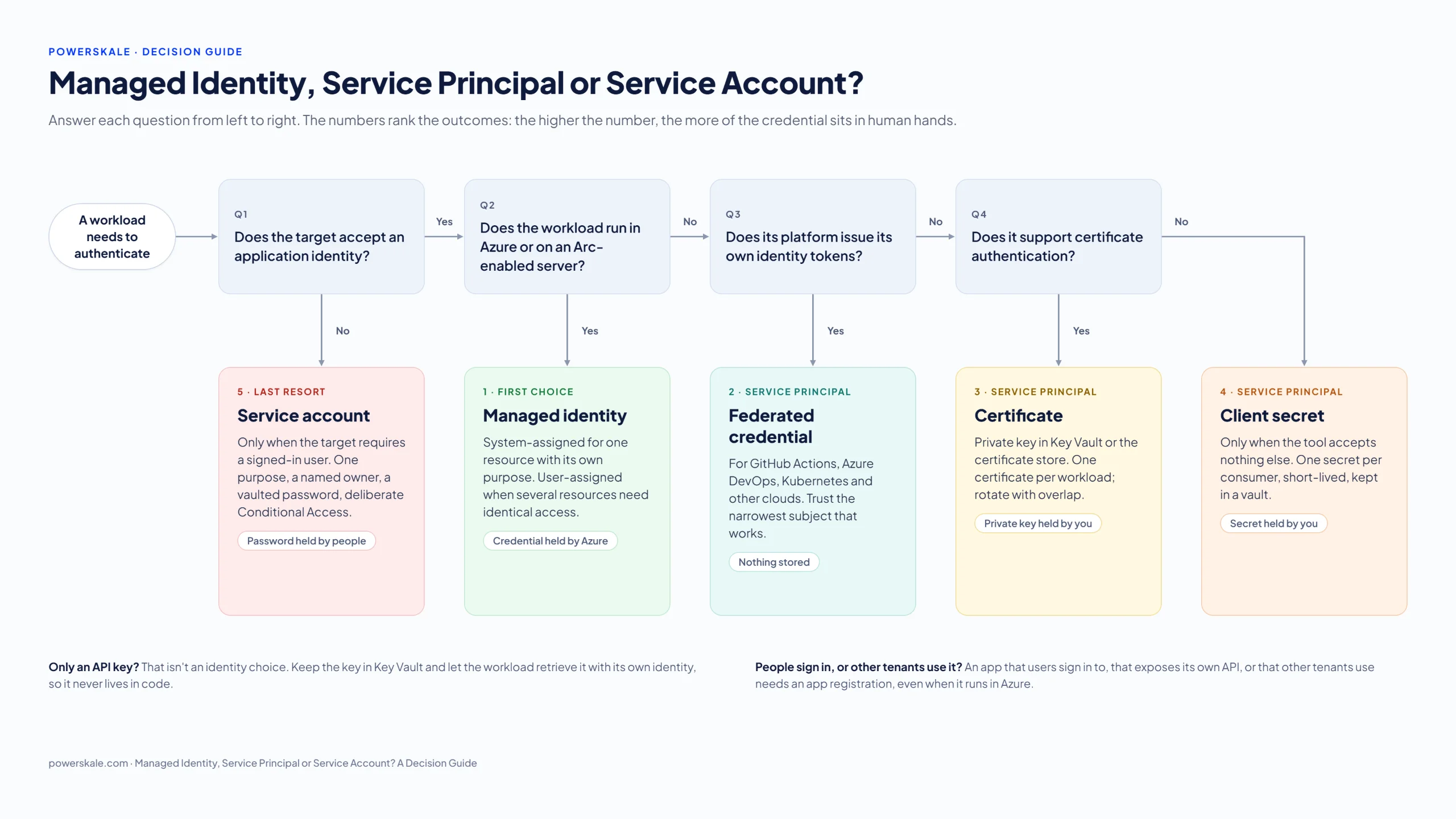
The tree combines the three steps into one route:
Does the target accept an application identity? If it only accepts a signed-in user, use a service account with a single purpose, a named owner, a vaulted password and deliberate Conditional Access.
Does the workload run in Azure or on an Arc-enabled server? Use a managed identity: system-assigned for a single purpose, user-assigned for genuinely shared access.
If not: does its platform issue its own identity tokens? Use a service principal with a federated credential, scoped to the narrowest subject that works.
If not: does it support certificate authentication? Use a service principal with a certificate, stored where the private key can’t be exported casually.
If not: use a service principal with a short-lived client secret, one per consumer, stored in a vault.
Each step down means more credential in human hands, and more work to keep it safe. The aim isn’t to never reach the bottom. It is to only end up there when you’ve checked every step above it.
Part III: Living With Your Choice
7. Whatever You Choose, Someone Must Own It
Part II was about choosing the right identity and the right credential. That choice determines how hard an identity is to misuse. It doesn’t determine who notices when something goes wrong, who answers for what the identity can do, or who switches it off when it’s no longer needed. A managed identity that nobody owns is still an orphan, just a better-protected one.
“Owner” in Entra isn’t the owner you need
Entra ID has an owners field on every app registration, and it’s tempting to treat that as the answer to the ownership question. It isn’t. An owner in Entra can manage every aspect of that application’s configuration. In practice, that is a privilege, not accountability. Chapter 5 showed why it matters: whoever can manage an app registration can add a credential to it. Microsoft makes the same point about its own admin roles: Application Administrators can add credentials to an application and use them to act as that application, which can give them more access than their own role does.
So there are two different questions here, and they need different answers.
Who can change this identity? Keep that list as short as possible.
Who is accountable for it? That should be a named business owner and a technical owner, recorded where your organization already tracks services and their dependencies, such as the CMDB.
Managed identities make the distinction even clearer. They don’t have an owners list at all; whoever controls the Azure resource controls the identity. Accountability has to follow the resource, through the same tags and registration you use for everything else in Azure.
Decide who can create them
By default, every user in a Microsoft Entra tenant can register applications and manage everything about the applications they create. Combined with chapter 1, that explains a lot: anyone can create an identity, add a secret and share it, without anyone else being involved.
Restricting this is straightforward. Set Users can register applications to No, and give the Application Developer role to the people who genuinely need it. Limiting user consent to applications belongs in the same decision.
The goal isn’t to stop people from building integrations. It’s to make sure a new identity is created through a path where its owner, purpose and permissions are recorded from the start. That is much easier than reconstructing them a year later.
Scope what an identity can reach
Chapter 3 made the point that the credential determines how likely misuse is, and the permissions determine how much damage it does. Of the two, permissions are where most organizations are generous without realizing it.
Microsoft Graph application permissions apply to the whole tenant by default. An application with the Mail.Read application permission can read every mailbox, not just the one mailbox the integration was built for. For Exchange Online, RBAC for Applications fixes that. It lets you grant an application access to a defined set of mailboxes, scoped by a filter or an administrative unit, and it replaces the older Application Access Policies.
There is one trap. Permissions granted in Entra ID and through Exchange RBAC add up. If the application still holds the tenant-wide permission in Entra ID, the scoped role assignment changes nothing. You have to remove the broad permission for the scoping to take effect. SharePoint offers a comparable model with the Sites.Selected permission, which grants access per site instead of to every site.
For Azure resources, the principle is the same: assign roles at the narrowest scope that works. Assign them on the Key Vault or storage account the workload uses, not on the subscription because that was quicker.
Watch what they do
Sign-in activity and audit logs for workload identities are included without an extra license. Three signals are worth watching:
New credentials appearing on an application, especially on identities with broad permissions.
Sign-ins from places where the workload doesn’t run.
Identities that no longer sign in at all.
For that last signal, Entra ID offers a recommendation that flags applications that haven’t been used for more than 90 days. Managed identities are exempt from it, though, so they need their own check. Remember the detail from chapter 4: deleting a managed identity doesn’t remove its role assignments.
If you have the Workload ID Premium license, Conditional Access can go a step further. You can block sign-ins by a service principal from outside known locations, or when Entra ID Protection detects risk. For a high-privilege service principal with a certificate or secret, that means a leaked credential is useless outside your own network. The limitations are significant, though:
It only applies to single-tenant service principals registered in your own tenant.
It doesn’t cover managed identities.
Block is the only available control.
Policies assigned to a group aren’t enforced for service principals in that group. Each identity has to be assigned directly.
Review on a schedule, retire on purpose
Identities rarely get worse on their own. They become wrong because everything around them changes: the integration is rebuilt, the permissions are no longer needed, the owner moves on, or a better credential option becomes available. A periodic review asks four questions:
Is this identity still used?
Does it still need these permissions?
Is its credential still the best available option, or is it a secret from before federation was possible?
Does its owner still work here, and do they know they own it?
Retire identities deliberately. Disable first, wait long enough for anything that still depends on it to surface, then delete, and remove role assignments explicitly rather than assuming they go with it. Connect this to your leaver process as well: when someone leaves, check which identities they own, not just which accounts they use.
Choosing the right identity is a decision you make once. Owning it is something you keep doing for as long as it exists.
8. Limitations and Trade-offs
The order in this article is sound, but it isn’t free. Every step up the ladder removes a credential from human hands and adds something else: a dependency, a constraint or more work. It’s better to know those costs in advance than to discover them halfway through a migration.
Every option moves the risk somewhere
A managed identity removes the credential, but it also removes some of your controls. Conditional Access for workload identities doesn’t apply to managed identities, so you can’t restrict them by location or risk the way you can a service principal. Their security rests almost entirely on who can deploy code to the resource. Managed identities also belong to a single tenant, so anything that has to work across organizations needs an app registration anyway.
Federation removes the stored secret, but it makes your security depend on another platform’s configuration. A federated credential for GitHub Actions is only as strong as the branch protection, environment rules and repository permissions in GitHub. Those settings are usually managed by a different team, in a different tool, with a different change process. Federation is also unforgiving to set up. Issuer and subject have to match exactly, and a mismatch doesn’t show up until the token exchange fails. That makes the first setup slower than creating a secret, which is exactly the moment people are tempted to take the shortcut.
Certificates move the burden to operations. Someone has to issue them, store them properly, renew them before they expire and update every place that uses them. An expired certificate breaks a process just as reliably as an expired secret. Without automation, a certificate is mostly a secret that’s harder to share and just as easy to forget.
Service accounts can be made safer, but never safe. Every measure in chapter 6 reduces the risk; none of them removes the fundamental problem that a password exists and people can use it.
The tree is a simplification
A decision tree has to leave things out to stay usable. Some situations don’t fit cleanly:
Hybrid workloads that run partly in Azure and partly on-premises.
Integrations that span tenants.
SaaS integrations where the vendor stores your credential. That last one deserves attention. When a SaaS product asks for a client ID and secret, your vault discipline ends at the vendor’s door. How they store and protect that secret becomes part of your security, and you have very little say in it. Short lifetimes, narrow permissions and monitoring of that service principal’s sign-ins matter even more there.
The tree also assumes that the answer to each question is known. In practice, “does this connector support a service principal?” or “does this service accept Entra ID tokens?” sometimes takes real research, because support changes over time and documentation doesn’t always keep up. Power Platform managed identity is a good example: it’s generally available for Dataverse plug-ins, while support elsewhere in the platform is still developing.
Fixing the past is the expensive part
Applying the tree to a new workload is easy. Applying it to everything that already runs is not.
Most organizations have years of client secrets in pipelines, scripts and integrations, and service accounts holding connections nobody fully maps anymore. Microsoft’s own Zero Trust workshop guidance rates migrating existing CI/CD service principals to workload identity federation as a high-effort task. Each conversion has to be tested, each dependency found, and each connection on a service account re-authenticated.
That is no reason not to do it. It is a reason to prioritize instead of trying to do everything at once, which is what the next chapter is about.
The best controls cost extra
Several of the controls that make workload identities manageable at scale require a Workload ID Premium license. That includes Conditional Access, ID Protection and access reviews for privileged service principals. The basics are included: creating identities, managed identities, federation, sign-in logs and application management policies.
Without Premium, a lot of monitoring becomes manual work. Whether that license is worth it depends on how many high-privilege service principals you have. For a handful, a disciplined manual review may be enough. For hundreds, it rarely is.
Secure has to be the easy path
The biggest limitation isn’t technical. Under time pressure, people take the fastest route that works, and right now that is often still a client secret. Chapter 1 started there.
A decision guide doesn’t change that by itself. What changes it is making the secure option the default:
templates and pipelines that use federation out of the box;
infrastructure code that creates a managed identity together with the resource;
local development set up so nobody needs a secret to test;
a process for requesting a service principal that is quicker than working around it.
If the secure path takes a day and the shortcut takes five minutes, the shortcut wins, however good the guidance is.
Guidance has a shelf life
Finally, this article describes the situation as it is today. Microsoft keeps expanding managed identity support, adding federation scenarios and introducing new identity types, as Entra Agent ID shows. A connector that only supports user accounts today may support service principals next year.
The order itself will hold: fewer credentials in human hands is always better. But the answers to the questions in the tree will change. Decisions made a year ago deserve to be checked against what’s possible now.
9. Where to Start
Everything in this article is easier to apply to the next workload than to the hundreds that already run. That is also where most of the risk sits: in secrets created years ago, service accounts nobody maps anymore, and permissions granted for a test that became production. The decision tree at the end of Part II tells you where each workload should end up. This chapter is about how to get there without turning it into a project that never finishes.
First, stop adding to the problem
The instinct is to start with an inventory. Start one step earlier. As long as new secrets and unowned identities keep appearing, every inventory is out of date the day it’s finished.
A few measures close the tap quickly and cost little:
Restrict who can register applications. Give the Application Developer role to the people who need it.
Set application management policies. Block new client secrets by default, with explicit exceptions, and set a maximum lifetime for secrets and certificates. These policies don’t require a Premium license.
Make the secure path the default. Use federation in pipeline templates, managed identities in infrastructure code, and local development on the developer’s own account. Chapter 8 explained why this matters more than any guideline.
None of this touches existing workloads, so the risk of breaking something is low. It does mean that from now on, the problem stops growing.
Then, find out what you have
An inventory of workload identities answers the same three questions for every identity: what credential does it use, what can it access, and is it still used?
App registrations are the easiest part. Each one shows its credentials: secrets, certificates and federated credentials, with their expiry dates. Service principal sign-in logs show when each one was last used.
Managed identities need a separate look. They don’t have credentials to inventory, but they do have role assignments. And as chapter 4 noted, those assignments can outlive the identity itself.
Service accounts are the hardest to find, because in Entra ID they look exactly like employees. Naming conventions help if they were followed. Otherwise, look for user accounts that only sign in non-interactively, accounts without a person behind them in HR systems, and accounts that hold connections in Power Platform. If you’ve read Why Power Platform Gets Messy, the logic is the same: you can’t govern what you can’t see, so knowing what exists comes before designing what’s next.
Prioritize by risk, not by count
The inventory will be long. Working through it alphabetically is the surest way never to finish. Combine the two halves of risk from chapter 3, the credential and the permissions, and start where both are bad.
What you find | What to do first |
|---|---|
An identity unused for 90 days or more | Disable it, wait, then remove it and its role assignments |
A client secret with tenant-wide Graph permissions or broad Azure roles | Scope the permissions first, then replace the credential |
A pipeline authenticating with a secret | Convert it to federation |
A workload in Azure using a secret | Switch it to a managed identity |
A service account with admin roles or connections across departments | Split it, vault the password, and check whether the connectors now support a service principal |
A secret that expires soon | Don’t renew it on autopilot: use the expiry date as the moment to move it up the decision tree |
Some of these are quick wins. Removing unused identities shrinks the attack surface without changing anything that runs. Pipeline service connections that Azure DevOps created itself can be converted to workload identity federation with a built-in tool. Start with these, because early results make the slower migrations easier to justify.
The last row deserves emphasis. Every expiring secret is a natural moment to ask whether it should still be a secret at all. Turn expiry from an incident into a migration trigger, and the backlog shrinks on its own schedule.
Keep it from drifting back
Cleaning up once isn’t enough. Without ownership and review, the same situation returns within a year. Make sure every identity has a recorded owner and a scheduled review, as described in chapter 7. Check every change to a workload against the decision tree, not just new workloads. And repeat the inventory periodically, because the platform’s possibilities keep changing too.
Back to the Teams channel
This article started with a client secret posted in a Teams channel. The obvious response is to tell people not to do that again. It won’t help much. Under time pressure, people share what they need to share to get something working.
The real fix is to make sure there is nothing to share. A workload with a managed identity or a federated credential has no secret that can end up in a chat. A service principal that can only be created through a recorded process has an owner who knows it exists. And an identity reviewed on a schedule doesn’t quietly outlive its purpose.
That is what the order in this article comes down to. Not a preference for one Microsoft feature over another, but a steady reduction of the number of credentials that people can see, copy, share or forget.

Comments
Sign in to join the conversation.
Sign inCreate accountNo comments yet. Start the conversation.