
Part I - Why Power Platform Gets Messy
Innovation Outruns Governance, If You Let It
Nobody plans a Power Platform mess. It usually starts with something small and useful.
Someone in finance is tired of chasing approvals by email and builds a flow that routes them through Teams. A team lead replaces a shared Excel file with a simple canvas app. An analyst connects a SharePoint list to a few automated notifications. None of this involves a project, a budget or a ticket to IT. It takes an afternoon, and it works.
That is exactly what the platform was designed to do. Power Platform lowers the barrier to building far enough that the people closest to a problem can solve it themselves. In most Microsoft 365 tenants, the capability is already there. Users can start building with standard connectors without requesting anything, and by default their work lands in the default environment, where every licensed user can create.
So the first solutions arrive quietly. Colleagues see what works and ask for the same. HR copies the finance flow. The canvas app is shared with another department. A maker who started with one automation now maintains fifteen. Adoption spreads the way good tools spread: by word of mouth, without central coordination.
For a while, that feels like success. In many ways, it is.
The problem is not that innovation is happening. The problem is that nobody decided how it should be governed while it was happening. Governance is rarely torn down. It simply never gets built, or it stays designed for a handful of experiments while the landscape around it grows into something else entirely.
At some point, that landscape crosses a threshold nobody noticed. Personal productivity tools have become part of how departments operate. Apps built for one person are used by fifty. Flows that began as experiments now move data between business systems. And the questions nobody asked at the start become difficult to answer. Who owns this app? What data does this flow touch? Which connectors are in use, and where does that data go? What happens when the person who built it leaves?
That last question is often how organizations discover the problem. A maker changes jobs, their account is disabled, and a flow that quietly supported a business process stops running. Nobody knew it existed until it failed. Other discoveries come through an audit, a security review, a licensing discussion, or someone in IT opening the admin center and seeing the full inventory for the first time.
I have seen many forms of sprawl, but the pattern I encounter most often is a different one. Departments that grow tired of waiting decide to take matters into their own hands and build their own governed environment, with their own rules, their own connector policies and their own idea of what “controlled” means. The intention is good, and it often comes from exactly the right instinct. But IT usually doesn’t know which governance has been implemented, or why. The result is not less sprawl, but a different kind: inconsistent rules across the organization, and more work for everyone involved, because control now has to be regained not only over the solutions, but over the governance itself.
This is what sprawl looks like in practice. It is not one big failure, but many small, reasonable decisions that were never connected to each other. Sometimes those decisions are individual apps and flows. Sometimes they are entire governance models, built in parallel by people trying to solve the same problem IT hasn’t solved yet. Each made sense on its own. Together, they form a landscape without consistent ownership, without a shared lifecycle and without a clear picture of risk.
That is what “if you let it” means. Innovation does not destroy governance by attacking it. It does so by moving faster than governance was designed to move. When building takes hours and oversight takes quarters, the gap grows by default.
The instinctive response is to slow innovation down. This article argues for the opposite: designing governance that can move at the same pace as the people who build.
The Root Causes
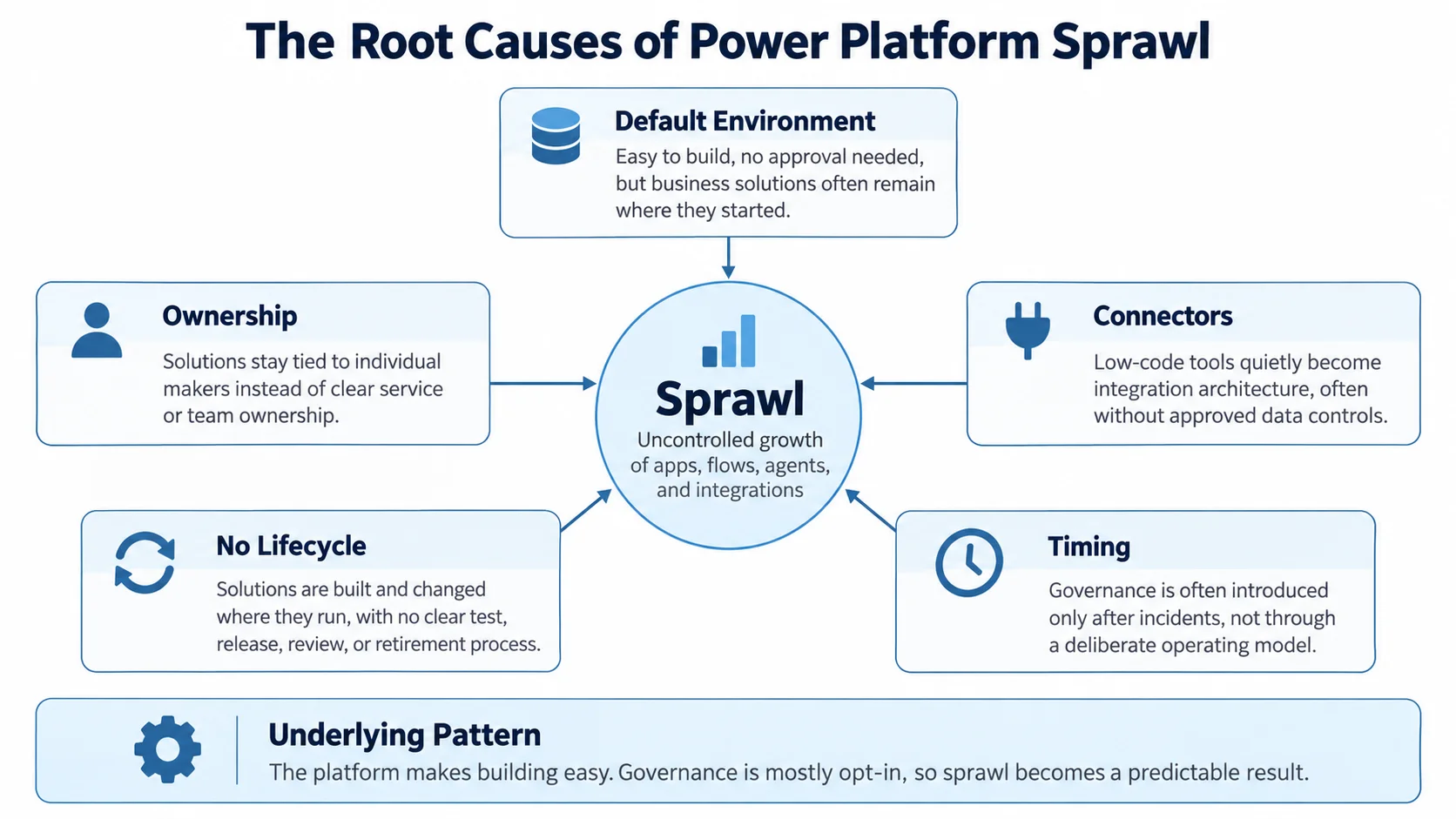
It is tempting to blame sprawl on makers who ignore the rules. In most cases, that is unfair. Makers solve real problems with the tools they are given, in the way those tools invite them to. The causes of sprawl are mostly structural.
The first is the default environment. Every tenant has one, every licensed user can build in it, and no request or approval is needed. That makes it a good place to experiment, but a poor place to run business processes. Yet that is where successful experiments tend to stay, because nobody tells them to move and there is often nowhere obvious to move them to.
The second is ownership. A solution belongs to the person who built it, and its connections often run under that person’s identity and permissions. When an app built for one person becomes a departmental tool, its ownership doesn’t follow. There is no team and no service owner, only a name that may disappear from the directory when someone leaves.
The third is connectors. They are what make the platform powerful, and what quietly turn a productivity tool into an integration platform. Makers connect internal systems, external services and sometimes personal accounts without thinking of it as integration architecture. Without data policies in place, nothing prevents business data from flowing to places the organization never approved. Copilot Studio agents push this boundary further, because they can act on connectors with less predictable behavior.
The fourth is the absence of a lifecycle. Most solutions are built and changed directly where they run. There is no test environment, no release moment and no point at which anyone decides a solution should be reviewed or retired. The tools for proper ALM exist, but they only help if someone has set them up and explained why they matter.
The fifth is timing. Governance is usually introduced after something goes wrong, which means it is shaped around the latest incident rather than around a deliberate model. And when central governance is absent or too slow, departments fill the gap with their own rules, as described in the previous chapter.
None of this is accidental. Microsoft provides the tools to address almost every one of these causes, but nearly all of them are opt-in. The platform is optimized to make building easy and leaves governance to the organization. Sprawl is the predictable result when organizations haven’t yet decided how that ease should be governed.
Caught Between Control and Adoption
When IT finally confronts the sprawl, it usually reaches for one of two responses. Both are understandable, and both tend to make things worse.
The first is to lock the platform down. Connectors are blocked, environment creation is restricted, and every new solution needs approval. On paper, control is restored. In practice, the demand that created the sprawl doesn’t disappear. Makers who used to build in the open start working around the restrictions, with spreadsheets, unsanctioned SaaS tools or solutions hidden in corners IT doesn’t look at. Or, as I see most often, departments build their own governance because they can no longer wait for the central version. Lockdown doesn’t remove shadow IT. It produces shadow governance.
The second response is to leave things as they are. Adoption is valuable, makers are productive, and governance feels like a cost without an immediate benefit. This works until it doesn’t. The risk keeps growing quietly until an incident, an audit or a departing employee forces the issue. At that point, the organization doesn’t move toward balanced governance. It swings straight to lockdown, under pressure and with less goodwill than before.
Many organizations move back and forth between these two positions. Each swing costs trust on both sides. Makers learn that IT is a blocker, and IT learns that makers can’t be trusted.
Underneath this lies a capacity problem. A central team that reviews every solution in the same way will never keep up with a platform that lets thousands of people build. Governance becomes the bottleneck, not because the people involved are slow, but because the model treats a personal to-do app and a business-critical integration as the same kind of risk.
The real issue is not how much control an organization needs. It is where and when that control should apply. Most solutions don’t need a review. Some need a light one. A few need serious scrutiny. Governance that cannot tell the difference will always be either too strict or too late.
The rest of this article is about designing governance that can.
Part II - How to Govern It at Scale
The Core Principle: Proportional Governance
The answer to the control-versus-adoption problem is not a new idea. Risk-based thinking already exists across IT. Change management distinguishes between standard changes that are pre-approved and changes that need review. European regulation follows the same principle. The General Data Protection Regulation (GDPR) only requires a data protection impact assessment when processing is likely to result in high risk. The NIS2 Directive asks for cybersecurity measures that are proportionate to the risk, and the EU AI Act sorts AI systems into risk categories, with obligations that grow as the risk increases. Power Platform governance rarely applies the same logic. Most organizations either govern everything in the same way or govern nothing at all.
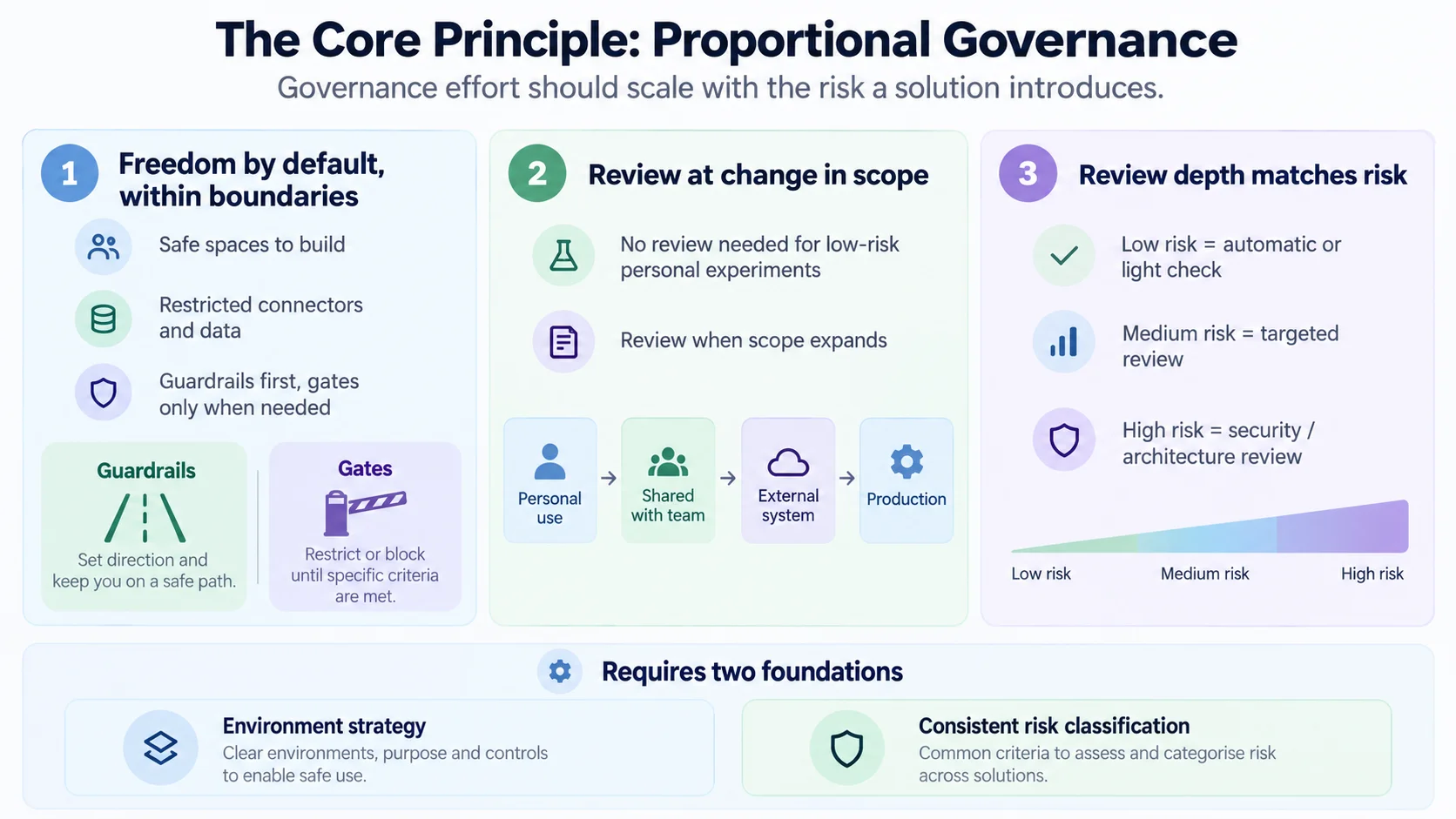
Proportional governance means that the effort spent on governing a solution scales with the risk that solution introduces. In practice, that rests on three ideas.
The first is that freedom is the default, within boundaries. Anyone should be able to build and experiment without asking permission, as long as they do so in a space where the potential damage is limited. That means an environment where sensitive data isn’t available, connectors are restricted and solutions can’t be shared widely. The boundaries do the governing, so no human approval is needed. This is the difference between guardrails and gates. Guardrails are technical controls that work automatically and stay mostly invisible. Gates are moments where someone has to review and decide. Good governance relies on guardrails wherever possible and reserves gates for decisions that genuinely require judgment.
The second is that the decision moment is a change in scope, not the moment of creation. A solution built by one person, for one person, with limited data rarely needs a review. The same solution does need one when it is shared with a department, connects to an external system, starts writing to business data, or moves into production. Governance should respond to those transitions. Reviewing every new app is wasted effort. Missing the moment an app becomes business-critical is where the real risk lies.
The third is that the depth of review matches the risk. A solution that slightly expands its audience can be approved automatically or with a light check. A solution that processes personal data, uses privileged permissions or supports a critical process deserves a thorough review by security or architecture. The criteria for each path should be transparent, so that makers can predict what will be asked of them before they start.
That predictability is what turns governance into an enabler. Makers know they can start immediately. They know which changes will trigger a review, and what that review will look like. And they know that a low-risk solution will not wait in the same queue as a high-risk integration. Governance stops being an obstacle that appears unexpectedly and becomes a path that solutions follow as they grow.
None of this works without two things: an environment strategy that creates safe spaces to build, and a way to classify risk consistently. The following chapters cover both.
Environment Strategy as the Foundation
If proportional governance relies on guardrails, environments are where those guardrails live. An environment determines who can build, what data is reachable and how far a solution can travel. That makes the environment strategy the most important governance decision an organization makes, and often the one made last.
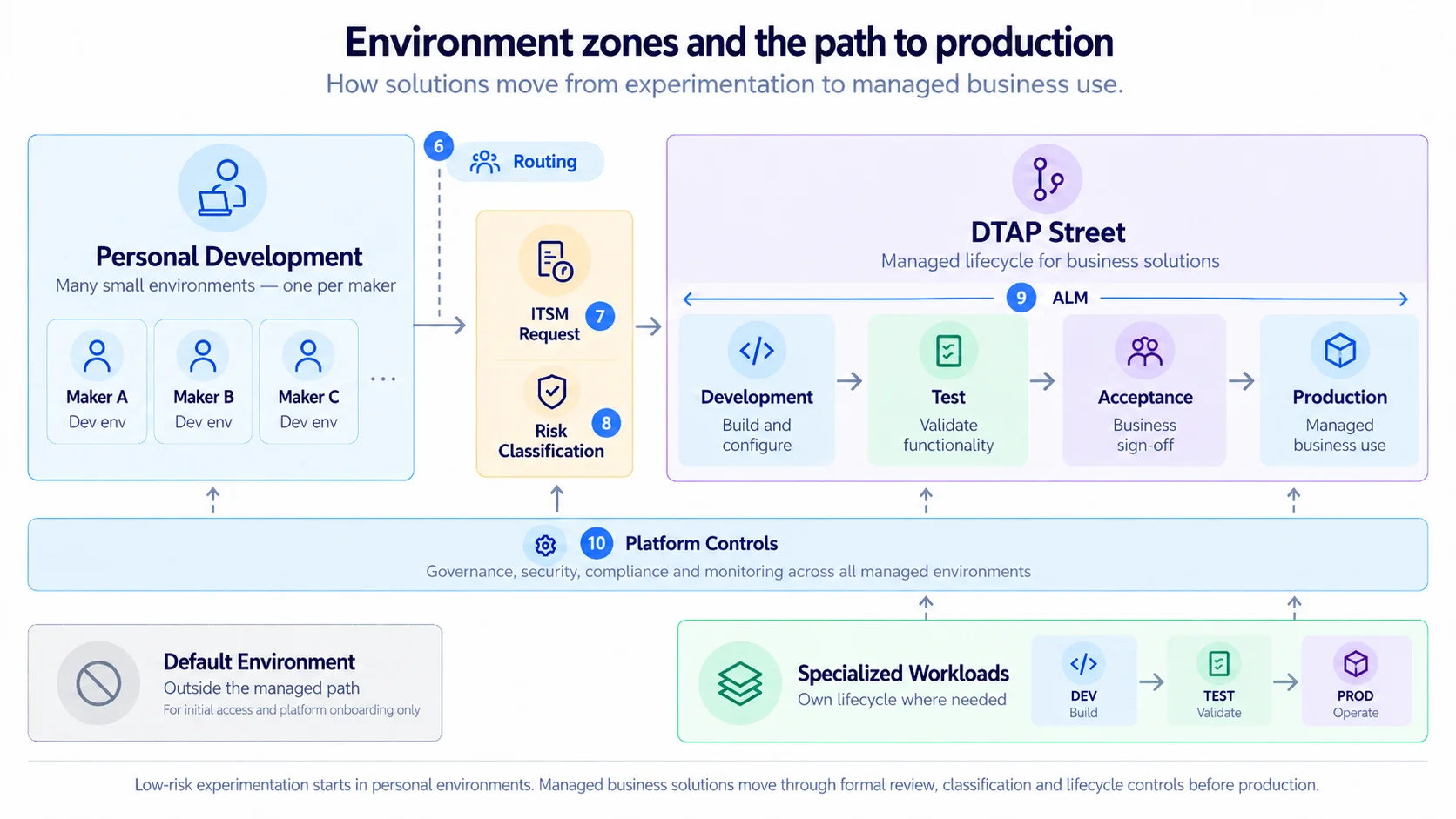
Instead of governing each solution individually, you define a small number of zones, each with its own level of trust. A solution’s zone tells you most of what you need to know about its risk, and moving from one zone to the next is exactly the change in scope where review belongs.
Zone | Purpose | Governance level |
|---|---|---|
Personal Development | Free experimentation by individual makers | Low, enforced by guardrails |
Development / Test / Acceptance | Building and validating solutions that will be shared | Moderate, managed and traceable |
Production | Business use | Strict, with a named owner |
Specialized Workloads | Dedicated, regulated or isolated solutions | Custom, decided per case |
Each zone maps to an environment group, so that policies are applied to the zone as a whole rather than environment by environment. Environment groups rely on Managed Environments, which brings licensing requirements that should be clear before the design is finalized.
The key design decision lies within the DTAP street: do you create a DTAP set per department, per solution, or one shared set for the whole organization? Per solution gives the best isolation and the clearest ownership, but multiplies the number of environments. A shared set is easy to manage, but mixes solutions with very different risk profiles. Many organizations end up somewhere in between: shared environments for low-risk solutions, and dedicated sets for anything critical.
Starting Safe: Environment Routing and Personal Development
Without intervention, every maker starts in the default environment. As chapter 2 described, that is where sprawl begins. The default environment is shared by all users in the tenant, and anyone who signs up for Power Apps is automatically added to its Maker role. Environment routing changes that starting point.
When environment routing is enabled in the Power Platform admin center, makers land in their own personal developer environment instead of the default environment. The setting is off by default and has to be switched on by an admin. The maker still starts building immediately, without a request or approval. The difference is where that building happens.
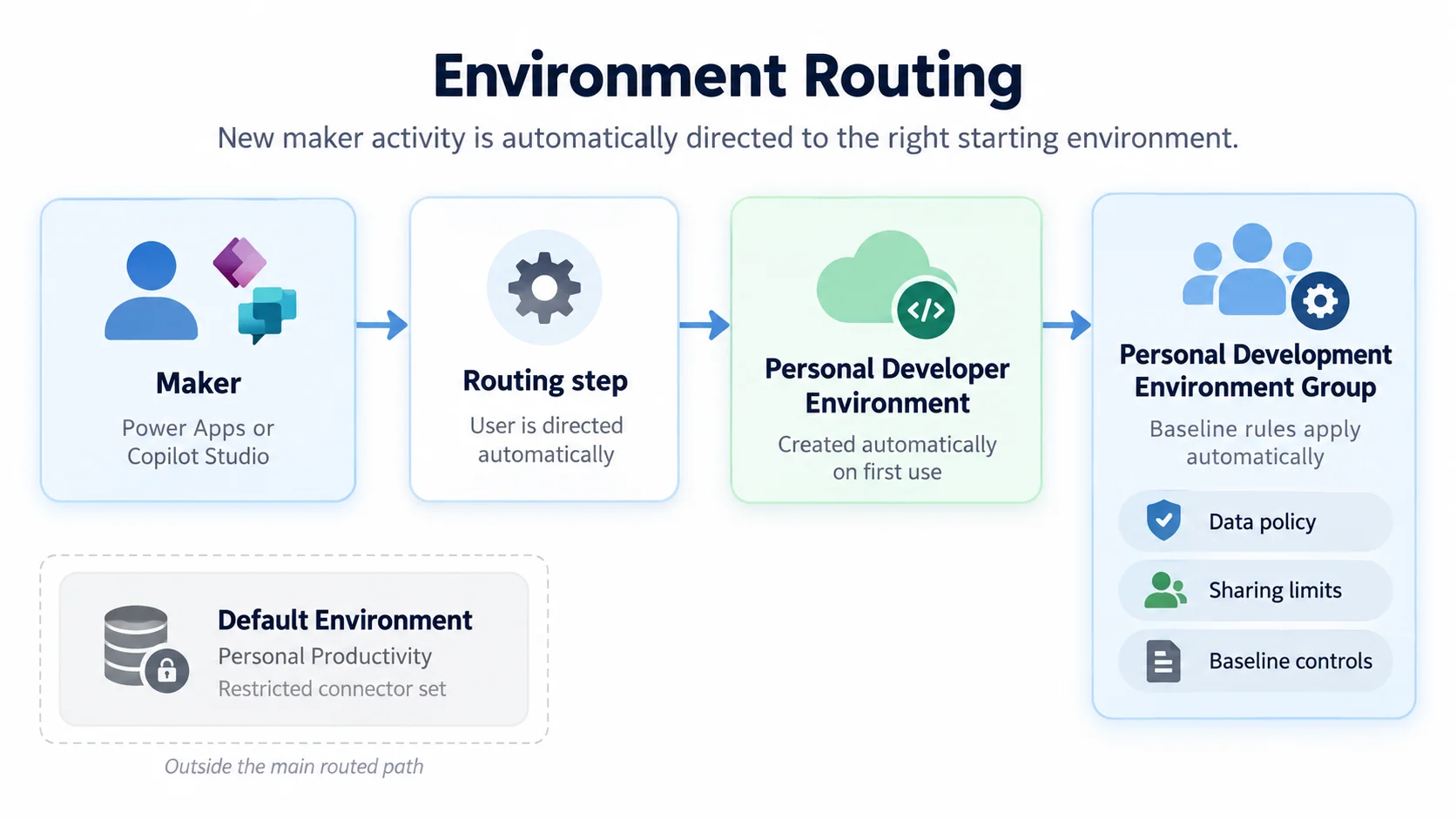
The key design choice is to combine routing with an environment group. When routing creates new developer environments directly in a single environment group, each one is preconfigured with the baseline controls the organization requires. That matters, because makers are assigned the admin security role in their own developer environment. They control their space, so the guardrails must come from the group, not from the environment itself.
Licensing reinforces the boundary. All developer environments created through routing are Managed Environments by default, and users in a managed developer environment need premium licenses to run Power Platform assets. In my view, that makes the personal environment a place to build, not a place to run solutions for others. The moment colleagues need to use a solution, it has to move, and that is exactly the change in scope covered in the next chapter.
The default environment doesn’t disappear. It can’t be deleted, and Microsoft recommends renaming it to something like Personal Productivity Environment to make its intent clear. Treat it that way: a space for small personal tools, with a tight connector policy and nothing that a business process depends on. Existing solutions that already live there need a separate migration effort.
Routing has limits worth knowing. Coverage differs per portal and has changed over time, so check which ones your tenant supports. And every maker now has an environment, which means more environments to monitor and a need for a policy on inactive ones.
From Personal Environment to DTAP: Registration in Your ITSM
The personal environment is where solutions start. The DTAP street is where they become business solutions. The step between the two is the most important moment in the lifecycle, because it is where a personal tool becomes something the organization depends on. That step should not happen through an email or a quick favor from an admin. It should go through the same system the organization already uses for requests, changes and ownership: its ITSM platform.
Power Platform governance often ends up as a separate world, with its own spreadsheets, its own approval flows and its own inventory. That works until someone from service management asks what a broken flow depends on, or who should be called when it fails. Registering Power Platform in ITSM connects it to processes the organization already trusts.
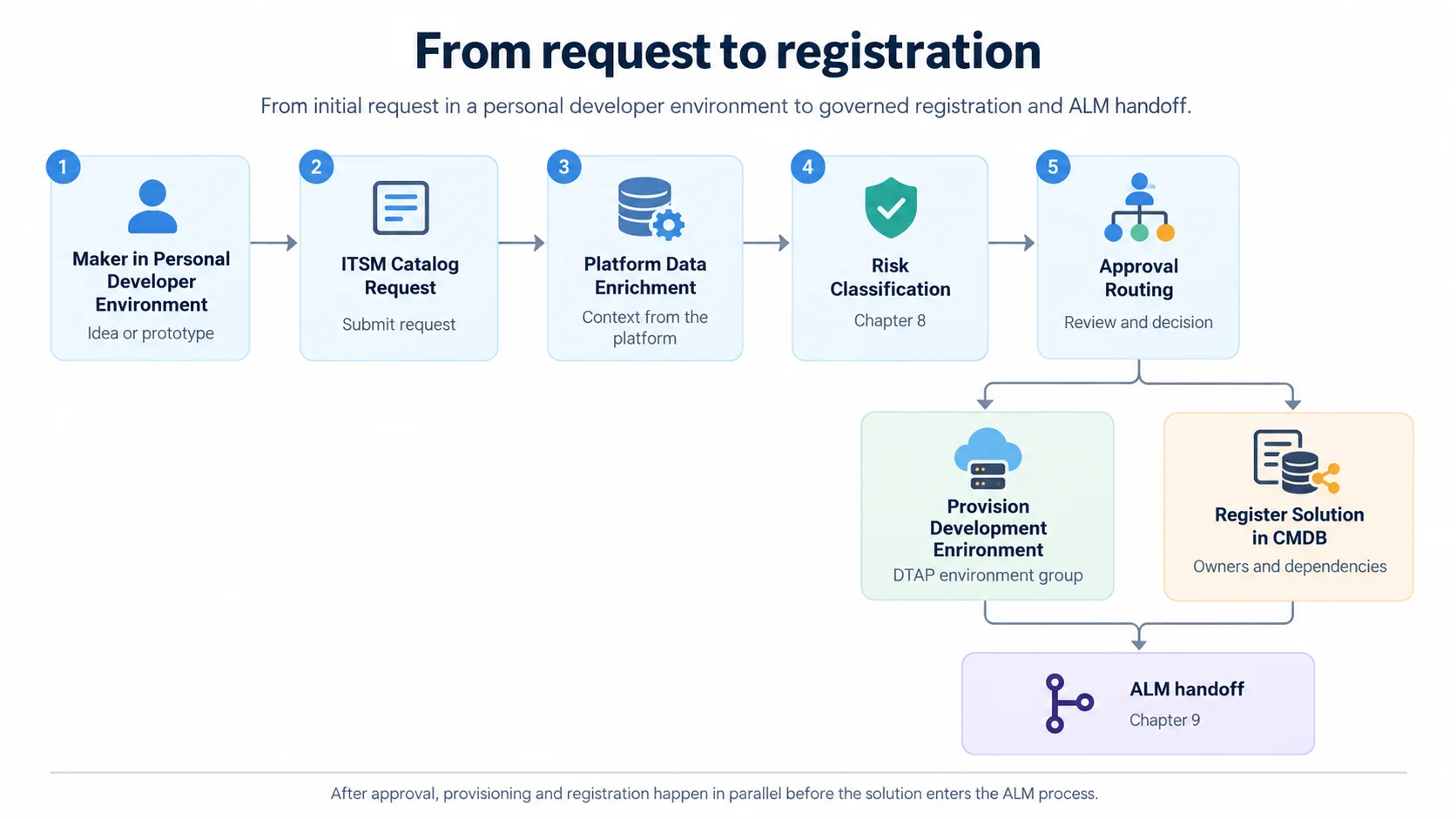
The request should capture what the risk assessment needs, and nothing more:
Request field | Why it matters |
|---|---|
Purpose and intended users | Defines the scope and business impact |
Business owner and technical owner | Makes ownership explicit from day one |
Data used | Determines data sensitivity |
Connected systems and connectors | Determines connectivity and external exposure |
Actions the solution performs | Read, write, delete or privileged actions |
Target zone | Standard DTAP or a specialized workload |
Two owners are deliberate. A business owner is accountable for why the solution exists. A technical owner is accountable for how it works. Together they remove the single point of failure described in chapter 2. Because ownership lives in the CMDB, it can also be connected to existing processes. When someone leaves the organization, the offboarding process can check which solutions they own and trigger a transfer before anything breaks.
Self-reported information is useful but not sufficient. Where possible, enrich the request with what the platform already knows, such as the connectors actually used in the solution. The more of the request is filled in automatically, the faster it moves and the more reliable the classification becomes.
The CMDB registration should cover both environments and solutions, with the relationships between them. That makes impact analysis possible: which solutions run in this environment, and which business processes are affected if a connector or system changes?
Not every solution needs to start in a personal environment. A planned project with a known scope can enter through the same catalog directly. The request is the same, only the starting point differs.
Classifying Risk Without Becoming the Bottleneck: Reach, Data, Impact Model (RDI)
A central team can’t review every solution in depth, and it shouldn’t have to. What it needs is a consistent way to decide which solutions deserve attention, and how much. That is the purpose of the RDI model. It turns the information from the request into a risk profile, and that profile determines the review path.
The model scores a solution on three dimensions, each from 1 to 4. Reach (R) asks which systems the solution connects to, from Microsoft 365 alone to multiple external connections with limited organizational control. Data (D) asks how sensitive the processed information is, from public to highly sensitive or regulated. Impact (I) asks what happens when it fails, from inconvenience for one user to critical financial, customer or compliance consequences. Together they form a base score between 3 and 12.
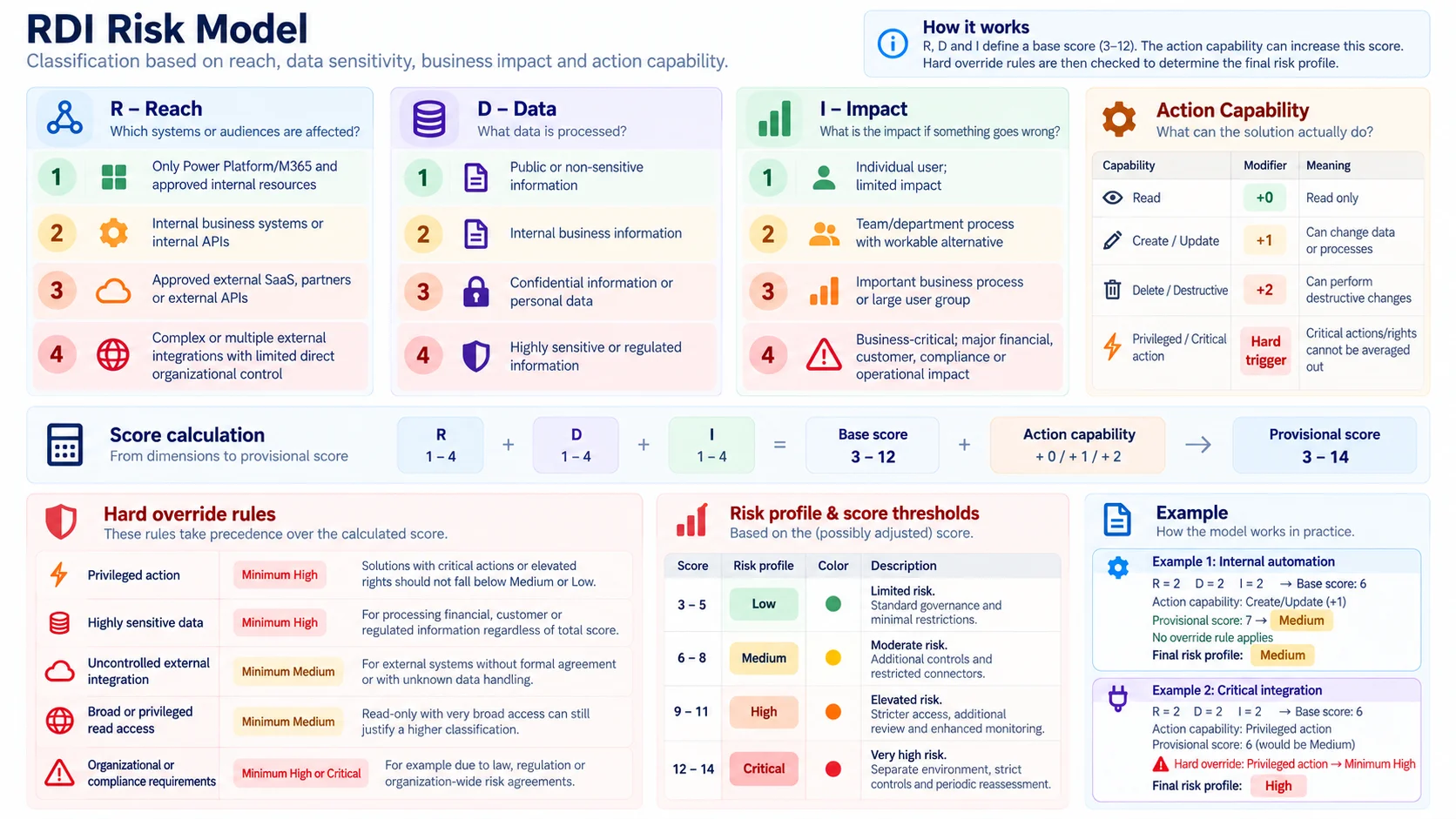
The base score describes where a solution sits, but not what it can do. Two solutions with identical reach, data and impact can carry very different risks if one only reads data and the other can delete it. Action capability captures that difference. Read adds nothing, create and update add 1, and delete or other destructive actions add 2. Privileged or critical actions don’t add points; they trigger an override. This dimension becomes increasingly important with agents, whose risk depends heavily on what they are allowed to do.
Because the model has three dimensions, it can also be drawn as a three-dimensional space. Every solution becomes a point in a cube, and its position shows more than its total score does.
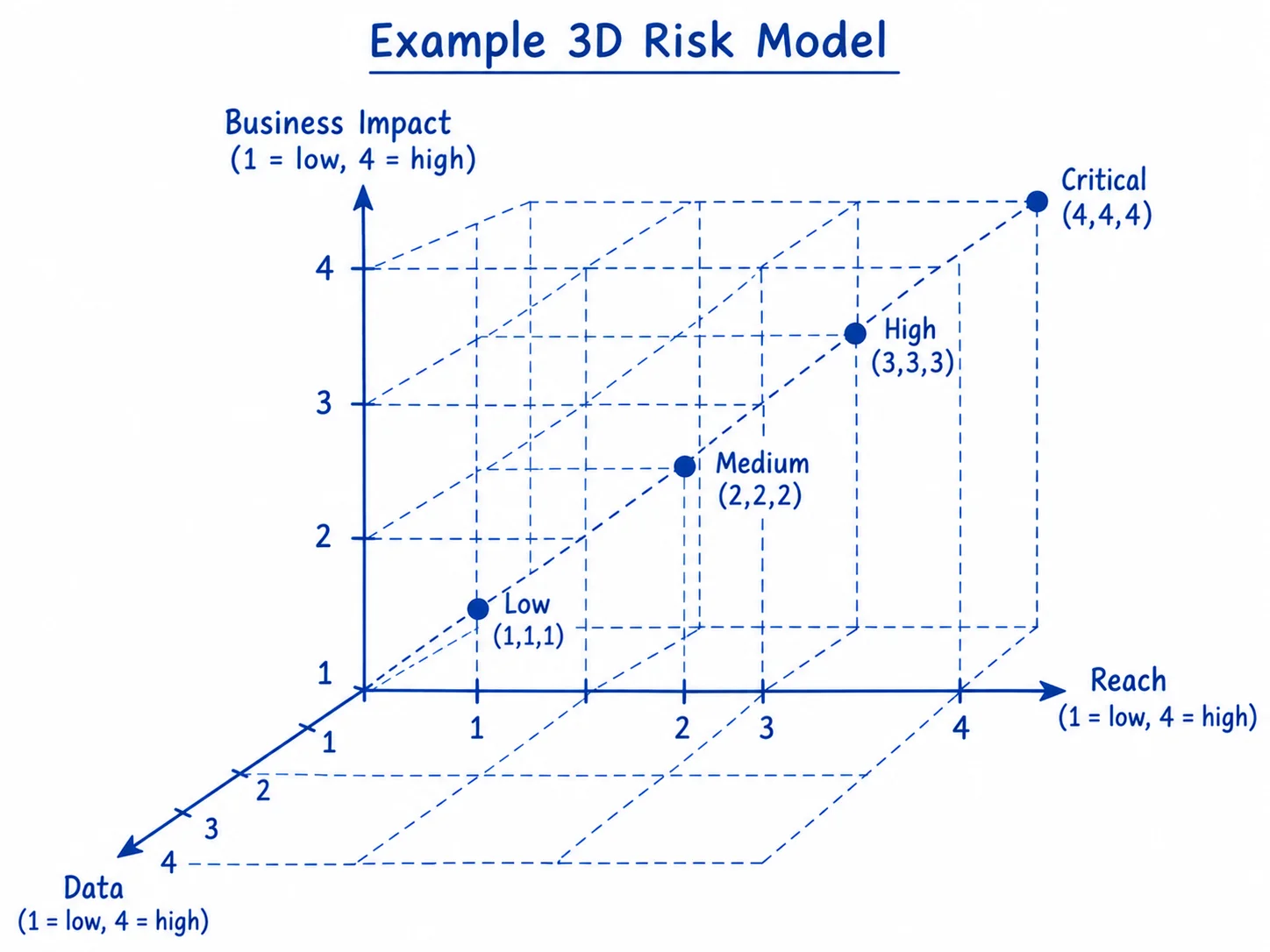
The 3D view also exposes the main weakness of adding scores together. A solution at R2, D2, I2 and one at R1, D4, I1 both have a base score of 6, yet they sit in very different places. The second processes highly sensitive data, and its low values on the other axes shouldn’t dilute that. Hard override rules prevent this. They set a minimum profile regardless of the calculated score:
Condition | Minimum profile |
|---|---|
Privileged or critical actions | High |
Highly sensitive or regulated data | High |
External connection without formal agreement | Medium |
Broad read access with elevated privileges | Medium |
Organization-specific compliance requirements | High or Critical |
The final score determines the profile, and the profile determines who needs to be involved:
Score | Profile | Review path |
|---|---|---|
3–5 | Low | Automatic approval or light check by the platform team |
6–8 | Medium | Review by the platform team |
9–11 | High | Security review and additional controls |
12–14 | Critical | Security, architecture and compliance review; dedicated environment |
Two examples show how this works. An internal automation scores 2 on each dimension, for a base score of 6. It creates and updates records, which adds 1, so its profile is Medium. A second solution has the same base score, but performs privileged actions. Its calculated score would also be Medium, but the override raises it to High. Same environment, same data, different capability, and a different review path.
Because the model is deterministic, it can run automatically in the ITSM platform as soon as a request is submitted. Low-risk solutions move on without waiting for anyone, while reviewers spend their time where it matters. The model doesn’t replace judgment: a reviewer can always raise a profile, but should never need to lower one quietly. And like any scoring model, its thresholds should be calibrated against real requests once it is in use.
ALM: A Controlled Path to Production
Once a request is approved, the solution enters the DTAP street. That street can feel like the kind of bureaucracy this article argues against. It isn’t, as long as every stage answers a question that genuinely needs answering. Between a maker’s first request and a build running in production, an organization wants clarity on four things: who is responsible, which risks were accepted, which technical checks were passed, and who pays. DTAP is how those answers are collected along the way, instead of discovered afterwards.
Stage | Question it answers | Responsible | Typical checks |
|---|---|---|---|
Development | Does it work? | Maker or development team | Solution-aware build, source control |
Test | Does it work correctly and safely? | Technical owner | Solution checker, functional and security tests |
Acceptance | Does the business accept it? | Business owner | User acceptance, sign-off, budget confirmation |
Production | Can it be run and supported? | Service owner | Approved deployment, CMDB registration, monitoring |
Solutions: the unit of change
Everything in this path depends on solutions. A solution is the container that holds the components belonging together: apps, flows, agents, tables and their configuration. Solutions are the foundation of ALM in Power Platform. Components built outside a solution can’t be moved, versioned or deployed in a controlled way, which is exactly why so many personal-environment builds get stuck.
Solutions come in two forms. An unmanaged solution is the editable version used in development. A managed solution is the locked package deployed to every other stage. When an unmanaged solution is exported as managed and imported elsewhere, its components can no longer be edited there. That is what protects test, acceptance and production from quick fixes made directly in the environment.
Two components make a solution portable. Environment variables replace hardcoded values with configuration per environment, and connection references separate credentials from the solution logic. The same solution can then point to a test system in Test and the real system in Production, without anyone changing the solution itself.
Azure Repos: the source of truth
A managed solution protects the downstream environments, but it doesn’t record what changed or why. That is the role of source control. With Git integration, teams sync solutions across Dataverse environments using a Git repository in Azure DevOps or GitHub. Every change is tracked with who changed what and when, and branches and pull requests introduce a second pair of eyes before anything moves forward.
For business-critical solutions, this is not optional. Without source control, the only copy of the truth is whatever happens to be in the development environment today. With it, every production build can be traced back to a reviewed change. Native Git integration is a feature of Managed Environments, and users who work with source control need Azure DevOps licenses. That cost belongs in the business case.
Pipelines: deployment without production rights
The final step is moving the solution through the stages. Power Platform pipelines always deploy managed solutions to non-development environments, and every target environment must be a Managed Environment. Pipelines can be extended with gated steps. A pre-deployment step can pause a deployment after approval and before import, until custom logic signals that it may continue. With delegated deployment, the deployment runs under elevated credentials such as a service principal, so makers don’t need edit rights in production to ship to it.
That gate is where the ITSM process from chapter 7 comes back. A pre-deployment step can check whether the change is approved in the ITSM platform before allowing the import, and write the result back to the change record and the CMDB. Approval and deployment are then one traceable chain, rather than two processes that happen to agree.
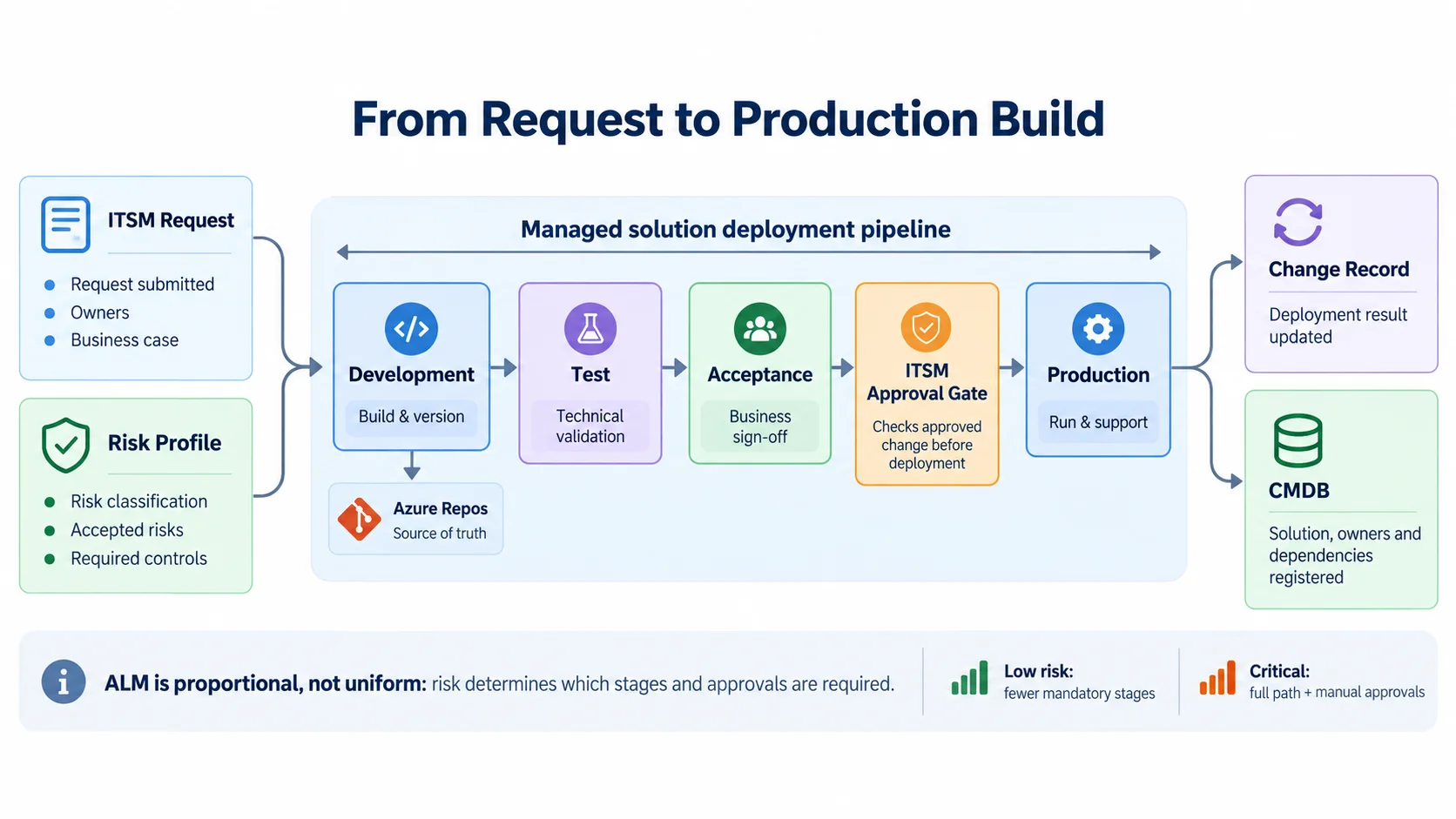
Proportional, not uniform
Not every solution needs the full street. A Low-profile solution may go from development to production through a pipeline with automated checks only. A Critical solution gets every stage, a dedicated set of environments and a manual approval at each step. The risk profile from chapter 8 decides which stages are mandatory. That is what keeps ALM a controlled path rather than a toll road.
Who Pays? Cost Management and Copilot Credits.
Low-code is not low-cost. A solution that reaches production brings premium licenses for its users, Dataverse capacity, Azure DevOps licenses for source control and, increasingly, AI consumption. In many organizations, all of this lands on the IT budget by default, even when the use case belongs to Legal, HR or Finance.
That creates two problems. IT becomes the department that pays for everyone else’s innovation, which turns it into the department that has to say no. And the departments that benefit see the platform as free, with no reason to think about efficiency. Both work against the principle of this article. Governance that doesn’t block innovation also needs a cost model where the owner of the use case owns its costs.
Copilot Credits
AI makes this more urgent, because its costs depend on usage rather than on the number of users. Copilot Credits are the common currency across Copilot Studio capabilities, available through pay-as-you-go meters, prepurchase plans and prepaid packs. With pay-as-you-go, one credit costs $0.01, and each prepaid pack provides 25,000 credits per month. Unused monthly capacity from a pack does not carry over.
How many credits an agent consumes depends on its design. Different features are billed at different rates, and some usage carries no charge for users with a Microsoft 365 Copilot license. Two agents that look similar can have very different running costs. That is why a cost estimate belongs in the request, not in the first invoice. Microsoft provides a Copilot Studio agent usage estimator for this purpose.
Attributing costs to the right department
The environment is the unit of billing. A billing plan links one or more environments to an Azure subscription, and usage is then billed against that subscription. This lets teams pay through Azure subscriptions tied to their own departmental budgets, with Azure Cost Management and tags to divide up costs. Budgets can be set per billing policy or per individual meter.
This makes the DTAP design from chapter 5 a financial decision as well. If HR’s solutions run in HR’s environments, linked to HR’s subscription, the costs follow the ownership automatically. One limitation: Azure Cost Management shows what was billed per meter and billing policy, but not which environments, apps, agents or users drove the usage. That breakdown comes from the Power Platform admin center.
Prepaid credits need extra attention. Credits from a pack can be allocated to a specific environment or left unallocated at tenant level. But allocation is not a reliable budget ceiling. Once consumption has passed an allocation, the allocation can’t be lowered, and a linked pay-as-you-go plan can keep billing after prepaid capacity is exhausted. Alerts and regular review matter more than the allocation itself.
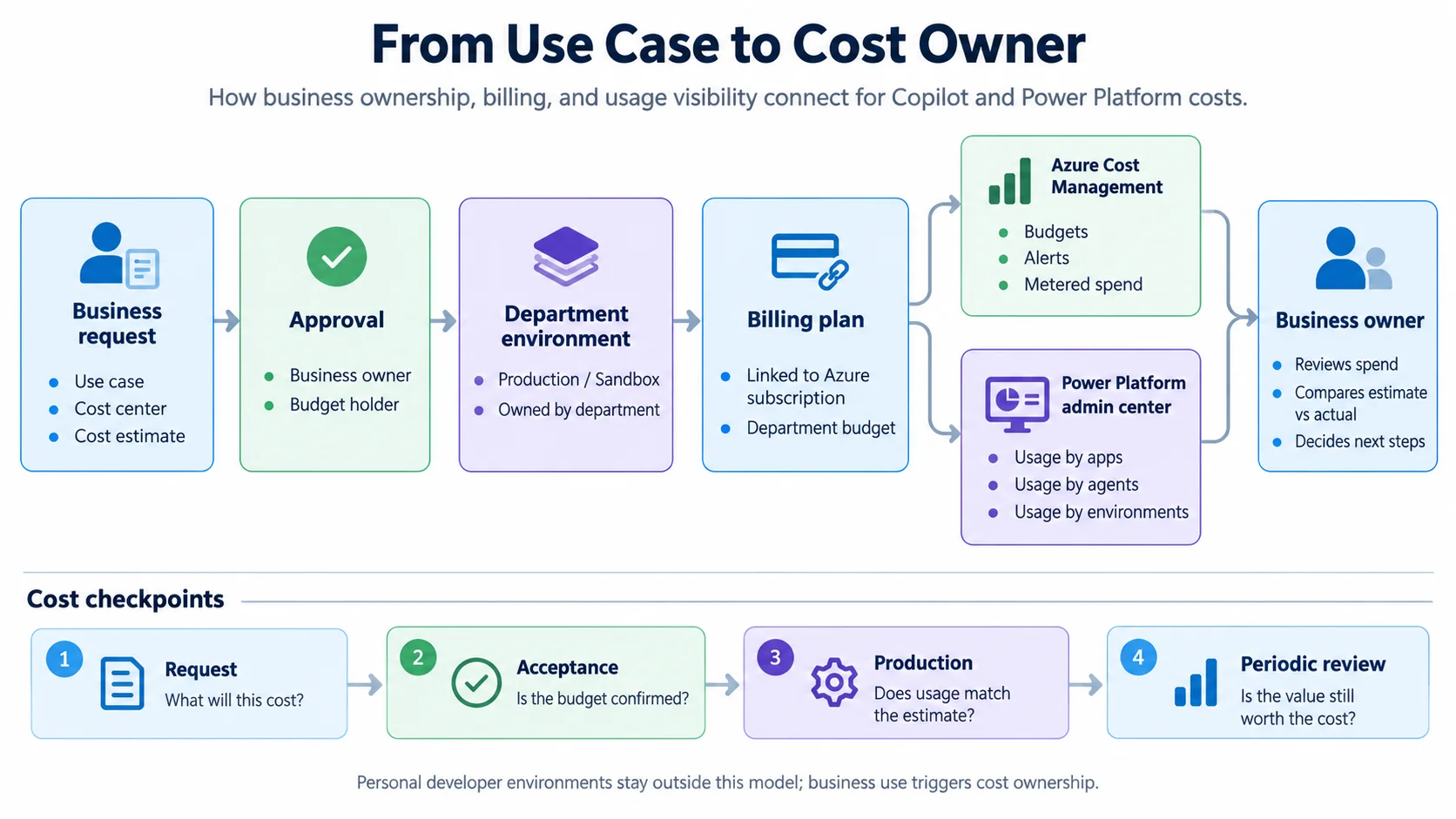
Cost as part of the lifecycle
Moment | Cost question | Owner |
|---|---|---|
Request | What will this cost, and who pays? | Business owner |
Acceptance | Is the budget confirmed? | Business owner, budget holder |
Production | Does actual usage match the estimate? | Service owner |
Periodic review | Is the value still worth the cost? | Business owner |
Experimentation stays outside this model. Personal developer environments run on the developer plan, and pay-as-you-go is only available for production and sandbox environments. Costs begin where business use begins, at the same change in scope that triggers everything else in this article.
Limitations and Where to Start
Everything in this article sounds logical on paper. In practice, it is a lot. Environment strategy, ITSM integration, a risk model, ALM, cost allocation and platform controls all involve different parts of the organization: IT operations, security, architecture, service management, finance, privacy and the business departments that build the solutions. Getting all of them aligned can easily become a project in its own right.
And often, that project has no budget of its own. There may be no room for a dedicated product owner, and no plan to hire Power Platform specialists. In many organizations, governance will have to be built by the IT people who are already there, next to their existing work. That is not a reason to give up, but it is a reason to be realistic. Choose a sequence that delivers control early, invest in the knowledge of your current team, and accept that the full model will grow in phases.
There are other limitations as well. The approach depends on the quality of the information in each request, and self-reported data is never complete. Review teams can still become a bottleneck if the low-risk path isn’t kept genuinely light. Managed Environments, premium licenses and source control all cost money. And any risk model needs calibration once it meets real requests. None of these are reasons not to start, but they are reasons to keep evaluating.
Start with what you already have
This article should get you a long way in designing better governance. But the best first step is not designing the future. It is understanding the present. If you don’t know what is running in your tenant today, and you can’t get control over it, no future model will work, however well it is designed.
Microsoft has made this easier. Power Platform inventory gives tenant administrators a unified view of all agents, apps and flows across the organization. It can also map which apps, flows and agents use a given connector, a feature still in preview. The data can be queried from Power Automate through the Power Platform for Admins V2 connector, so it can feed directly into your ITSM or reporting.
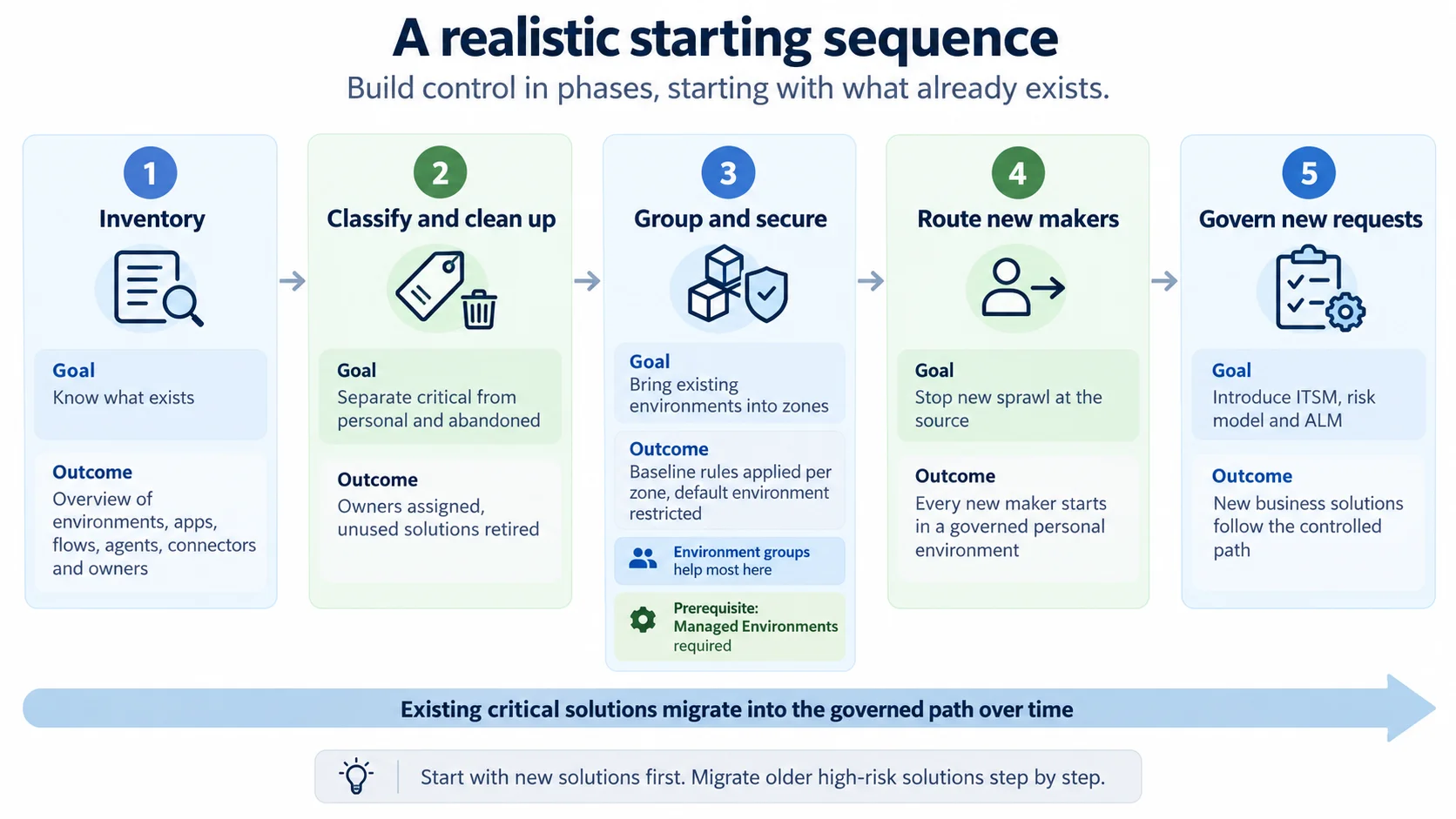
Phase | Goal | Outcome |
|---|---|---|
1. Inventory | Know what exists | Overview of environments, apps, flows, agents, connectors and owners |
2. Classify and clean up | Separate critical from personal and abandoned | Owners assigned, unused solutions retired |
3. Group and secure | Bring existing environments into zones | Baseline rules applied per zone, default environment restricted |
4. Route new makers | Stop new sprawl at the source | Every new maker starts in a governed personal environment |
5. Govern new requests | Introduce ITSM, risk model and ALM | New business solutions follow the controlled path |
Phase 3 is where environment groups help most, because rules can be applied to many environments at once. There is one prerequisite: environment groups can only contain Managed Environments, so enabling Managed Environments on existing environments, and its licensing impact, has to be part of this phase.
Phases 4 and 5 deliberately start with new solutions. Migrating every existing solution at once is rarely realistic. Once the path works for new requests, existing critical solutions can follow it one by one, starting with those that carry the highest risk.
Governance doesn’t have to be the bottleneck. But it does have to start somewhere, and the most honest place to start is with what you already have.
1 comment
Sign in to join the conversation.
Sign inCreate accountBradley van Welij
Hi